SQL Cells
A SQL cell runs a query and leaves the answer in the kernel as a pandas DataFrame, which the Python cells after it can use. It runs on a connection, a database you describe once in Settings, or on Dataframes, the pandas and polars frames the kernel already holds.
SQL cells need a Python kernel with pandas installed. Query Data with SQL walks through one from start to finish.
Add a Connection
Open Settings → Data connections and press Add…. You can also choose Add a connection… from a SQL cell’s connection picker.
| Type | Described by | Driver installed in the kernel |
|---|---|---|
| PostgreSQL | host, port, database, user, password | psycopg[binary] |
| MySQL | host, port, database, user, password | pymysql |
| SQLite | a file | none: Python’s own sqlite3 |
| DuckDB | a file, or none for one in memory | duckdb |
| Snowflake | host, database, user, password | snowflake-sqlalchemy |
| BigQuery | host, database, user, password | sqlalchemy-bigquery |
| Redshift | host, port, database, user, password | sqlalchemy-redshift |
| Databricks | host, database, user, password | databricks-sqlalchemy |
| ClickHouse | host, port, database, user, password | clickhouse-sqlalchemy |
| Other | a SQLAlchemy URL, and a password | the URL’s dialect |
Everything except SQLite and DuckDB goes through SQLAlchemy, which the kernel also needs. A file path that is not absolute is read from the project’s root. Test connects with what the form holds, saved or not, and says which server answered and how quickly.
Kept for decides where the connection is saved: This project, in
<project>/.zasper/connections.json, or All my projects, in ~/.zasper/connections.json. It
cannot be changed once the connection is saved. A project connection with the same name as one of
yours wins.
Passwords
A password is never written to connections.json, so a project’s connections can be committed and
shared; each person types their own password once. Zasper keeps it in the system keychain: Keychain
on macOS, Credential Manager on Windows, or the Secret Service on Linux, under the service zasper.
A machine with no keychain, such as a headless server or a container, keeps passwords in
~/.zasper/secrets.json, readable only by its owner. So does a keychain that has not answered within
20 seconds: macOS’s waits indefinitely when nobody can unlock it, as over SSH.
Write a Query
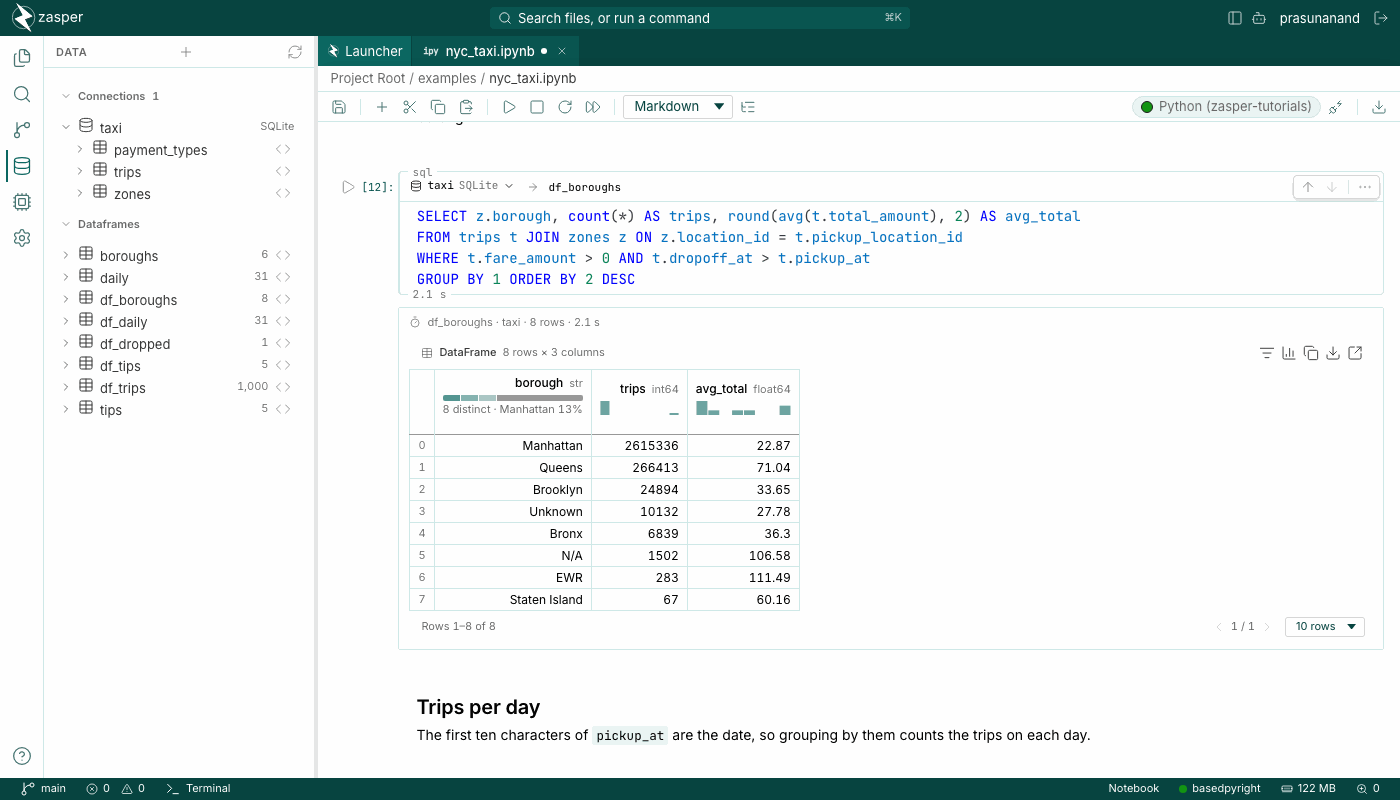
Add a SQL cell with SQL on the insert rail between cells, or turn a code cell into one with the cell type picker in the toolbar. The query keeps its text either way.
The head of the cell holds the connection picker and the name of the DataFrame the rows go into. A
new SQL cell runs on the project’s first connection, or on Dataframes when there is none, and writes
into the next free name, df_1, df_2 and so on. The editor completes table and column names in the
connection’s dialect.
The cell after it uses the result by name:
df_1.groupby("region").revenue.sum().plot.bar()
The language server knows that name too, so the cells after it are not flagged for an undefined name,
and df_1. completes as a DataFrame. Run All sends a cell only after the SQL cell above it has
gone, so a cell never reads a frame before it is made.
Dataframes are queried with DuckDB, which reads the kernel’s frames by name without copying them. A SQL cell on Dataframes can join the output of one SQL cell with a frame a Python cell made.
The Output
The output starts with a line that names the DataFrame and the connection, counts the rows, and says how long the query took. The DataFrame follows in the table view.
Rows are limited to 1,000 by default. When the limit left rows behind, Load all appears. The
first press counts the rows and estimates the memory reading them would take, such as
first 1,000 of 2,964,606 rows and Load all · about 885 MB. The second press runs the cell once with
no limit; the cell itself does not change. Counting runs the query again on the database, wrapped in
count(*), which is why it waits for a press, and it is cancelled after 10 seconds. A count that fails
says why, and the button becomes Load all anyway.
Answers are cached for an hour in the kernel, keyed by the connection, the query and the limit, so running a notebook from the top does not run every query again. The output line says when an answer came from the cache and how old it is, and Run fresh runs the query again. SQLite, DuckDB and Dataframes are never cached: they answer quickly, and the notebook itself changes them. The cache holds the last twenty answers and is cleared when the kernel restarts.
Interrupt stops a query. SQLite, DuckDB and PostgreSQL are told to cancel, which for PostgreSQL stops the query on the server too. A driver with no way to cancel, such as pymysql, is left to finish, and the cell says the database may still be running the query.
A query the database refuses shows the database’s own message, without a Python traceback.
Missing Packages
A kernel without pandas or the driver says so, such as
psycopg[binary] is not installed in /path/to/python, and offers to install it. The install runs
pip install, or uv pip install in an environment without pip, for that kernel’s interpreter. Run
the cell again afterwards.
The Data Panel
Data in the sidebar lists every connection. Opening one reads its schemas and tables, and opening a table reads its columns and their types. The code icon on a table, labelled Query table in a new SQL cell, adds a SQL cell below the current one, reading the first hundred rows. Under Dataframes are the frames the front notebook’s kernel holds.
The panel works without a notebook open, so it starts a kernel of its own on the Python chosen under
Settings → Python interpreter, or the project’s .venv. A driver the panel lacks is one the
notebook will usually lack too.
In a folder that is not trusted, running a SQL cell, testing a connection and reading one in the Data panel ask for trust first, because each runs code in a kernel. See Trusted Folders.
In the Notebook File
A SQL cell is saved as a code cell whose first line is a cell magic, so the file stays an ordinary notebook:
%%zasper_sql warehouse --out df_orders --limit 1000
SELECT region, sum(total) AS revenue
FROM orders
GROUP BY 1
Zasper hides that line and shows the cell’s head instead; changing the head rewrites it. --limit none
reads every row, and --out left out assigns the rows to _. The script export writes a SQL cell as
a commented # %% [sql] block, and the Markdown export as a fence tagged sql.
JupyterLab does not know the %%zasper_sql magic. Zasper’s server loads it into the kernel.
