Zasper 2.1.0
Zasper 2.1.0 brings coding agents into the IDE. The agent you already use works in a panel beside your notebooks, reads, edits and runs them through Zasper’s own tools, and everything it changes can be reviewed and undone. Underneath that, a notebook now keeps up with changes made to its file while it is open, and a run started anywhere reaches its cell.
brew upgrade zasper                   # Homebrew
sudo snap refresh zasper              # Snap
conda update zasper -c conda-forge    # conda
Prebuilt binaries are on the Downloads page.
Coding Agents
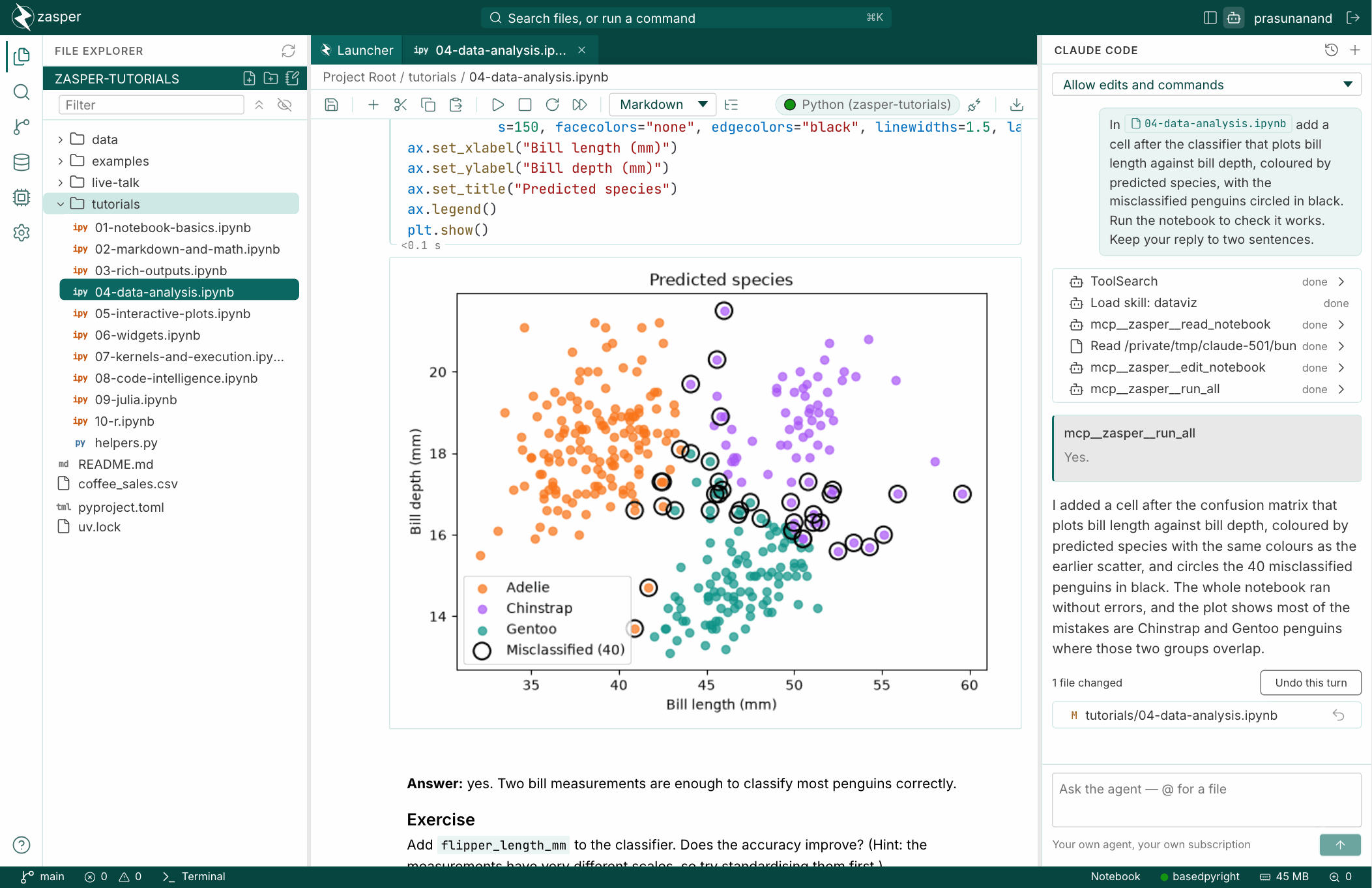
The bot in the top bar opens the agent panel on the right of the editor. Start Claude Code, Gemini CLI, Codex or any agent that speaks the Agent Client Protocol. It is your agent, signed in with your account and running on your subscription; Zasper holds no key and keeps no copy of the conversation.
- Zasper’s tools, with no setup. Every agent can list, read and edit notebooks cell by cell, run cells and whole notebooks in their live kernels, and look at the kernel’s variables and DataFrames. A notebook you have open shows the agent’s edits and runs as they happen, marked as its.
- Point it at things.
@finds a file, including one.gitignoreleaves out. A cell’s menu adds the cell, or its output, to your next message as it is on screen. - Choose what it may do without asking: nothing, edits, or edits and commands.
- Review and undo every turn. The files a turn changed are listed under it. Each opens a diff, with an undo for every changed block, or every changed cell of a notebook, and a file or the whole turn can be undone at once. Edits, commands and notebook tools all count, whoever made them.
- Past conversations in the project can be opened again and continued.
An agent you run in a terminal gets the same tools from zasper mcp:
claude mcp add zasper -- zasper mcp
Coding Agents and Zasper’s MCP Server have the details.
Notebooks That Keep Up
- A change made to a notebook’s file while it is open is taken in cell by cell. A cell you are typing in is left alone until you leave it, and only a cell both sides changed asks which to keep, on the cell itself.
- A run started anywhere reaches its cell: from another tab, from an agent, or with no tab open
at all. Its output is kept and shown in a tab that opens later, and
input()waits for a tab to answer it. - Notebook diffs, cell by cell, with outputs and metadata, for git’s changes and for a file changed on disk. Comparing Notebooks covers them.
- Run time beside each cell, and Markdown, GIF, WebP and PDF outputs.
Data
- A variables panel for the running kernel, and a grid for a DataFrame: hide, move and resize columns, export the ones you choose to CSV, and turn the grid into a chart, kept as the code that draws it. Exploring Data walks through it.
- SQL cells on the databases you connect, whose result is a DataFrame the next cells can use. SQL Cells has the details.
- Each kernel’s memory and GPU memory, as it runs.
Trusted Folders
A folder you open no longer runs anything until you say you trust it: not its kernels, not its
.venv, not a language server that runs code, not its git hooks. You can read every file and saved
output first. Zasper asks once per folder, and zasper --trust trusts the folder for one run, for
scripts and servers. Trusted Folders explains what runs and why.
Kernels and Languages
- Kernels in any conda environment are found, active or not.
- Language servers for Java, Scala, Kotlin, C#, shell, SQL and Haskell.
- A notebook that names no kernel starts one for the language it is written in.
- On Windows, interrupting a kernel works, and stopping one stops everything it started.
Fixes
- A notebook’s kernel no longer imports modules that happen to sit beside the notebook as it starts.
- Run All no longer sends a cell before the SQL cell above it has finished.
- A kernel slow to start is waited for, however long it takes, instead of 30 seconds.
- A kernel that dies says why, with the last lines it printed.
Upgrading from 2.0.0
- Each folder is asked about once. Nothing in it runs until you trust it.
- Scripts that use the API: the watch socket names the files that changed instead of sending
reload, and a save given ahashis refused with409when the file has changed since.
Installation explains both, and the changelog has the full list.
