<?xml version="1.0" encoding="utf-8"?><feed xmlns="http://www.w3.org/2005/Atom" xml:lang="en_US"><generator uri="https://jekyllrb.com/" version="3.10.0">Jekyll</generator><link href="https://zasper.io/feed/blog.xml" rel="self" type="application/atom+xml" /><link href="https://zasper.io/" rel="alternate" type="text/html" hreflang="en_US" /><updated>2026-09-17T18:15:11+00:00</updated><id>https://zasper.io/feed/blog.xml</id><title type="html">Zasper: High Performance IDE for Jupyter Notebooks | Blog</title><subtitle>Zasper is a high-performance IDE for Jupyter notebooks: up to 5× less CPU and 40× less RAM than Jupyter Server, in one static binary with no runtime.</subtitle><author><name>Prasun Anand</name></author><entry><title type="html">Zasper 1.1.0</title><link href="https://zasper.io/blog/zasper-1-1-0" rel="alternate" type="text/html" title="Zasper 1.1.0" /><published>2026-09-14T03:30:00+00:00</published><updated>2026-09-14T03:30:00+00:00</updated><id>https://zasper.io/blog/zasper-1-1-0</id><content type="html" xml:base="https://zasper.io/blog/zasper-1-1-0"><![CDATA[<p>Zasper 1.1.0 makes signing in part of every server, sets up a Python kernel for you when there
isn’t one, and fills in the notebook outputs and file types that 1.0.0 left out.</p>

<div class="language-bash highlighter-rouge"><div class="highlight"><pre class="highlight"><code>brew upgrade zasper                   <span class="c"># Homebrew</span>
<span class="nb">sudo </span>snap refresh zasper              <span class="c"># Snap</span>
conda update zasper <span class="nt">-c</span> conda-forge    <span class="c"># conda</span>
</code></pre></div></div>

<p>Prebuilt binaries are on the <a href="/downloads/">Downloads page</a>.</p>

<h2 id="signing-in-everywhere">Signing In, Everywhere</h2>

<p>Every Zasper server now requires its access token. When you start Zasper on your own machine it
opens your browser already signed in, so for most people nothing changes. On a server, the startup
banner prints a <strong>Sign in with</strong> link, and <code class="language-plaintext highlighter-rouge">ZASPER_ACCESS_TOKEN</code> keeps the same token, and the same
sessions, across restarts. <a href="/docs/deploying-on-cloud">Deploying on Cloud</a> walks through servers,
Docker and systemd.</p>

<h2 id="a-python-kernel-in-one-click">A Python Kernel in One Click</h2>

<p>If Zasper finds no kernel at all, the Launcher offers <strong>Set up a Python kernel</strong>. It creates a
<code class="language-plaintext highlighter-rouge">.venv</code> in your project, installs <code class="language-plaintext highlighter-rouge">ipykernel</code> into it (with uv when you have it) and lists it as a
kernel. It never touches your system or Homebrew Python. On Windows, Zasper now also finds kernels
installed for the Microsoft Store’s Python. See
<a href="/docs/installing-jupyter-kernels">Installing Jupyter Kernels</a>.</p>

<h2 id="more-outputs-more-files">More Outputs, More Files</h2>

<ul>
  <li><strong>Notebook outputs:</strong> LaTeX from SymPy and IPython’s <code class="language-plaintext highlighter-rouge">Latex</code> and <code class="language-plaintext highlighter-rouge">Math</code>, SVG from graphviz,
networkx and matplotlib, and JPEG images.</li>
  <li><strong>PDFs</strong> open in your browser’s viewer, with a Download button.</li>
  <li><strong>Markdown files</strong> have Edit, Preview and Side by side views.</li>
</ul>

<h2 id="tabs-that-come-back">Tabs That Come Back</h2>

<p>Zasper remembers the tabs you had open in each project and reopens them next time. Right-click a tab
to close others, close to the left or right, close saved tabs, copy its path or reveal it in the file
explorer, and every close action has a shortcut. There is a <strong>Help</strong> tab (<code class="language-plaintext highlighter-rouge">F1</code>) listing every
shortcut, and <strong>Toggle Sidebar</strong> (<code class="language-plaintext highlighter-rouge">⌘B</code> / <code class="language-plaintext highlighter-rouge">Ctrl+B</code>). <a href="/docs/files-and-tabs">Files and Tabs</a> covers
all of it.</p>

<h2 id="fixes">Fixes</h2>

<ul>
  <li>Opening a file no longer makes the whole window scrollable.</li>
  <li>A terminal resizes to its pane when you switch back to its tab.</li>
  <li>Closing a tab behind the active one no longer changes the active tab.</li>
  <li>Undo straight after a file loads no longer empties the editor.</li>
  <li>Closing a notebook while its kernel is still connecting no longer leaves that connection open.</li>
</ul>

<h2 id="upgrading-from-100">Upgrading from 1.0.0</h2>

<ul>
  <li><strong>Every server requires the access token.</strong> <code class="language-plaintext highlighter-rouge">--protected=false</code> is ignored.</li>
  <li><strong><code class="language-plaintext highlighter-rouge">ZASPER_JWT_SECRET</code> has been removed.</strong> Set <code class="language-plaintext highlighter-rouge">ZASPER_ACCESS_TOKEN</code> instead.</li>
  <li><strong>Zasper opens your browser on startup</strong> when it runs in a terminal. Pass <code class="language-plaintext highlighter-rouge">--no-browser</code> to turn
it off.</li>
</ul>

<p><a href="/docs/installation#upgrading-from-100">Installation</a> explains each one, and the
<a href="https://github.com/zasper-io/zasper/blob/main/CHANGELOG.md">changelog</a> has the full list.</p>]]></content><author><name>Prasun Anand</name></author><category term="blog" /><summary type="html"><![CDATA[Zasper 1.1.0 makes signing in part of every server, sets up a Python kernel when there isn't one, and fills in more outputs and file types.]]></summary></entry><entry><title type="html">Zasper 1.0.0</title><link href="https://zasper.io/blog/zasper-1-0-0" rel="alternate" type="text/html" title="Zasper 1.0.0" /><published>2026-09-10T03:30:00+00:00</published><updated>2026-09-10T03:30:00+00:00</updated><id>https://zasper.io/blog/zasper-1-0-0</id><content type="html" xml:base="https://zasper.io/blog/zasper-1-0-0"><![CDATA[<p>Zasper 1.0.0 is the first stable release. From this version on, Zasper’s HTTP and WebSocket API,
its configuration file and its command-line flags follow semantic versioning: they will not break
within 1.x.</p>

<div class="language-bash highlighter-rouge"><div class="highlight"><pre class="highlight"><code>brew <span class="nb">install </span>zasper-io/tap/zasper     <span class="c"># macOS</span>
<span class="nb">sudo </span>snap <span class="nb">install </span>zasper              <span class="c"># Linux</span>
conda <span class="nb">install </span>zasper <span class="nt">-c</span> conda-forge   <span class="c"># anywhere conda runs</span>
</code></pre></div></div>

<p>Prebuilt binaries for macOS, Linux and Windows are on the <a href="/downloads/">Downloads page</a>.</p>

<h2 id="whats-new">What’s New</h2>

<p><strong>Source control.</strong> A Git panel with real status, staging, discard and commits of staged changes
only; creating, switching and deleting branches; syncing with a remote; a readable history;
side-by-side diffs; and <code class="language-plaintext highlighter-rouge">git init</code> for a folder that isn’t a repository yet.</p>

<p><strong>Notebook outputs.</strong> ipywidgets, Plotly figures, GitHub Flavored Markdown with tables, and LaTeX in
markdown cells through KaTeX.</p>

<p><strong>Notebook editing.</strong> Reordering cells from the keyboard, insert options and context menus,
autocompletion from the kernel, and a dialog that catches unsaved changes when you close a tab.</p>

<p><strong>Notebooks round-trip exactly.</strong> Notebooks in formats 2 and 3 are converted to 4.5 when opened,
4.x files keep their own minor version when saved, and a saved notebook is byte-for-byte what Jupyter
would have written. Saves are atomic, so a crash or a full disk can’t leave a truncated notebook.
<a href="/docs/notebook-support">Notebook Support</a> has the details.</p>

<p><strong>Terminals</strong> that open in your project folder, and <strong>a command palette</strong> that searches files and
every command in one place.</p>

<p><strong>Nine themes</strong>, all built from one set of design tokens, and zoom for the whole window.</p>

<p><strong>Logging that stays out of the way.</strong> Readable output in a terminal, JSON for a log collector, and
by default only what changed or failed.</p>

<h2 id="upgrading-from-020-beta">Upgrading from 0.2.0-beta</h2>

<ul>
  <li><strong>The server binds <code class="language-plaintext highlighter-rouge">127.0.0.1</code> by default</strong> instead of every interface. To reach Zasper from
another machine, start it with <code class="language-plaintext highlighter-rouge">--host=0.0.0.0</code> and turn on protected mode. (From 1.1.0, protected
mode is always on; see <a href="/docs/deploying-on-cloud">Deploying on Cloud</a>.)</li>
  <li><strong>The Electron desktop app is gone.</strong> Zasper is a local server you open in your browser.</li>
  <li><strong><code class="language-plaintext highlighter-rouge">DELETE /ws/kernels/{kernel_id}</code> has been removed.</strong> Use <code class="language-plaintext highlighter-rouge">DELETE /api/kernels/{kernelId}</code>.</li>
  <li><strong>Kernel connection files moved</strong> to <code class="language-plaintext highlighter-rouge">~/.zasper/runtime</code>, readable only by you and deleted when
the kernel stops.</li>
  <li><strong>Zasper sends anonymous usage data</strong> unless you turn it off with <code class="language-plaintext highlighter-rouge">--tracking=false</code>;
<a href="/docs/configuration#anonymous-usage-data">Configuration</a> lists exactly what is sent.</li>
</ul>

<p>The <a href="https://github.com/zasper-io/zasper/blob/main/CHANGELOG.md">changelog</a> has the complete list,
including the security fixes in this release.</p>]]></content><author><name>Prasun Anand</name></author><category term="blog" /><summary type="html"><![CDATA[Zasper 1.0.0 is the first stable release: the HTTP and WebSocket API, the configuration file and the flags now follow semantic versioning.]]></summary></entry><entry><title type="html">Benchmarking Zasper v/s JupyterLab (Jupyter Server)</title><link href="https://zasper.io/blog/benchmarking-zasper-vs-jupyterlab" rel="alternate" type="text/html" title="Benchmarking Zasper v/s JupyterLab (Jupyter Server)" /><published>2025-04-28T02:09:59+00:00</published><updated>2025-04-28T02:09:59+00:00</updated><id>https://zasper.io/blog/benchmarking-zasper-vs-jupyterlab</id><content type="html" xml:base="https://zasper.io/blog/benchmarking-zasper-vs-jupyterlab"><![CDATA[<p>The primary goal of this benchmarking exercise is to compare the performance of Zasper against the traditional Jupyter Server. Through this comparison, we aim to determine how Zasper performs in a real-world scenario where multiple execute requests are made, with particular interest in resource consumption and efficiency. The focus areas for evaluation are:</p>

<ul>
  <li>CPU Usage</li>
  <li>RAM Usage</li>
  <li>Throughput</li>
  <li>Latency</li>
  <li>Resilience</li>
</ul>

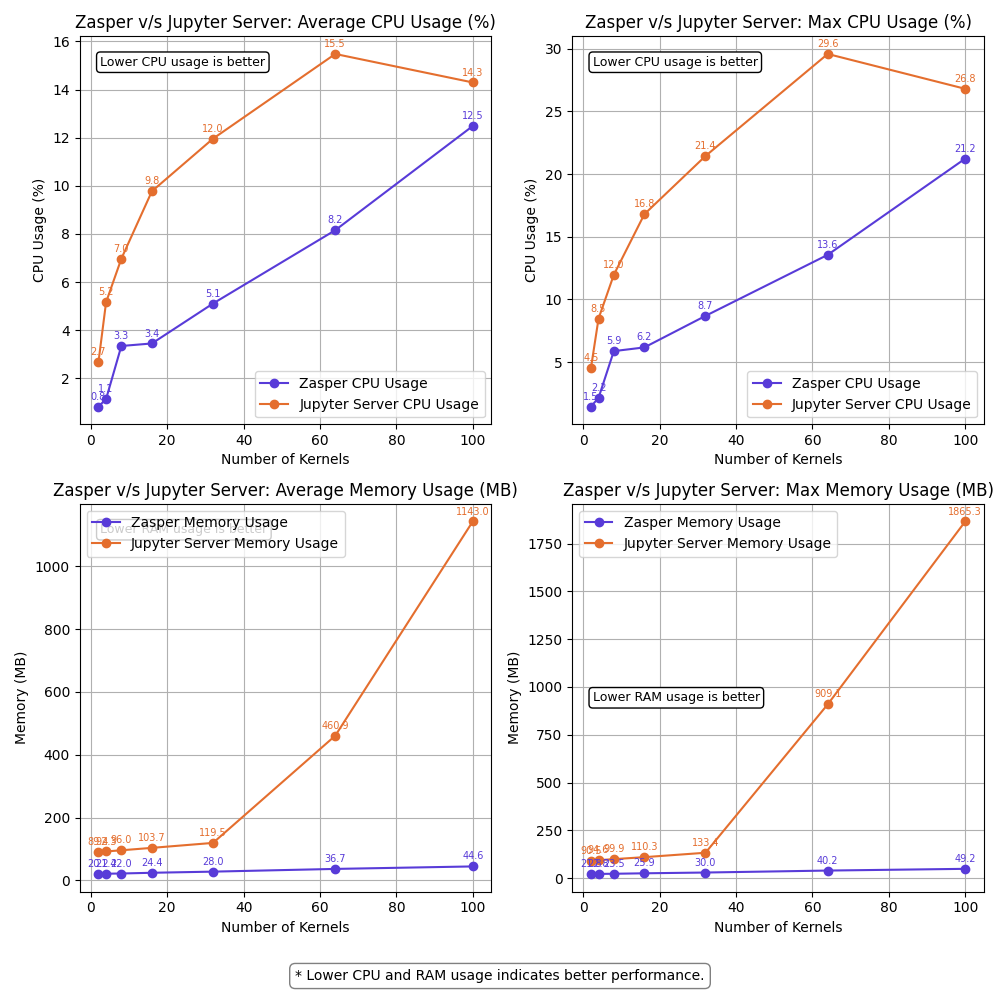
<p>Zasper is an IDE designed from the ground up to support massive concurrency. It provides a minimal memory footprint, exceptional speed, and the ability to handle numerous concurrent connections.</p>

<p>It implements <a href="https://jupyter-client.readthedocs.io/en/latest/messaging.html">Jupyter’s wire protocol</a> and can efficiently run Jupyter Notebooks.</p>

<p><a href="https://github.com/zasper-io/zasper">Project Github Link</a> |
<a href="https://github.com/zasper-io/zasper-benchmark">Benchmark Code Github Link</a></p>

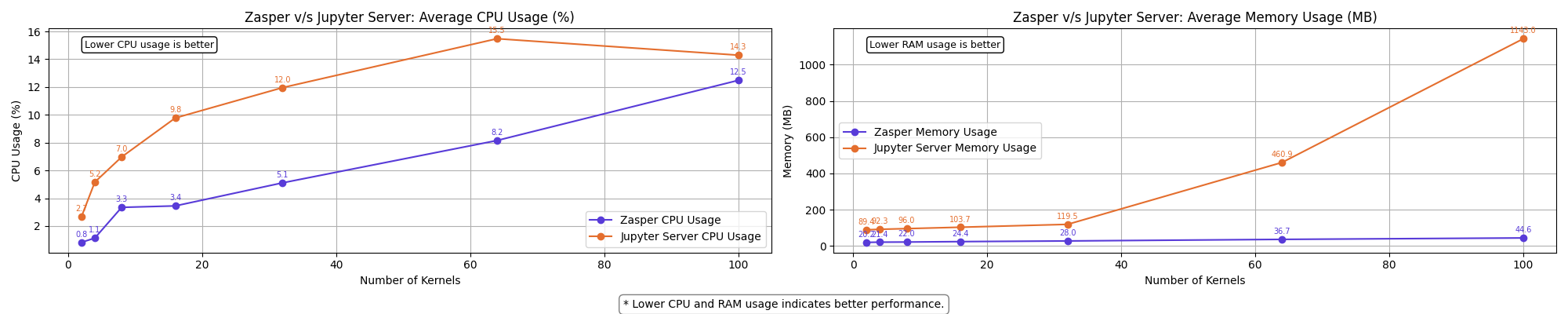
<h2 id="key-findings-at-a-glance">Key Findings at a Glance</h2>

<ul>
  <li><strong>Performance Gap</strong>: Zasper consistently outperforms Jupyter Server across all tested metrics</li>
  <li><strong>Resource Efficiency</strong>:
    <ul>
      <li>CPU: Zasper uses up to 5X less CPU resources</li>
      <li>RAM: Zasper uses up to 40X less memory</li>
    </ul>
  </li>
  <li><strong>Scalability</strong>: Zasper maintained performance with 64 kernels at 10 RPS per kernel, while Jupyter Server began failing at this load</li>
  <li><strong>Resilience</strong>: Zasper only failed under extremely high loads (64 kernels at 100 RPS per kernel)</li>
  <li><strong>Recovery</strong>: Zasper recovers more gracefully from overload conditions</li>
</ul>

<p><img src="https://raw.githubusercontent.com/zasper-io/zasper-benchmark/refs/heads/main/assets/summary_resources.png" alt="" /></p>

<p>Note: Jupyter Server powers Jupyterlab. Hence, I use the terms interchangeably.</p>

<h2 id="understanding-jupyter-server-architecture">Understanding Jupyter Server Architecture</h2>

<p>To establish a baseline, it is important to understand how a Jupyter Server operates internally. Here’s a simplified breakdown:</p>

<h3 id="1-session-lifecycle">1. Session Lifecycle</h3>

<p>A new session is initiated when a user opens a Jupyter notebook.</p>

<p>This session launches a kernel, which handles code execution.</p>

<h3 id="2-kernel-channels">2. Kernel Channels</h3>

<p>The Jupyter kernel communicates with the server over five dedicated channels:</p>
<ul>
  <li>stdin – for user inputs.</li>
  <li>shell – for sending execution requests.</li>
  <li>control – for kernel control messages.</li>
  <li>iopub – for publishing results back to the client.</li>
  <li>heartbeat – for kernel liveliness checks.</li>
</ul>

<p>For this benchmarking exercise, we focus only on:</p>

<ul>
  <li>Shell channel – used to send execution requests (e.g., <code class="language-plaintext highlighter-rouge">2+2</code>, <code class="language-plaintext highlighter-rouge">print("Hello World!")</code>)</li>
  <li>IOPub channel – used to receive outputs from the kernel (e.g., <code class="language-plaintext highlighter-rouge">4</code>, <code class="language-plaintext highlighter-rouge">Hello World!</code>)</li>
</ul>

<h3 id="3-communication-via-websocket">3. Communication via WebSocket</h3>

<p>A WebSocket is established between the user’s browser and the server, allowing real-time, bi-directional communication. The client send the messages over the websocket. When the jupyter_server receives this message it puts this message on a <code class="language-plaintext highlighter-rouge">shell channel</code> over ZeroMQ. This message when received by the kernel  triggers a computation in the kernel. The kernel emits the output on <code class="language-plaintext highlighter-rouge">iopub channel</code> over ZeroMQ. This message is received by Jupyter server and the output is put on websocket.</p>

<p><img src="https://raw.githubusercontent.com/zasper-io/zasper-benchmark/refs/heads/main/assets/kernel_communication.svg" alt="" /></p>

<h2 id="methodology">Methodology</h2>

<p>The benchmarking setup follows a controlled and repeatable process:</p>

<h3 id="1-session-initialization">1. Session Initialization</h3>
<p>A session is created and a WebSocket connection is established using a goroutine.</p>

<h3 id="2-execution-requests">2. Execution Requests</h3>
<p>A stream of <code class="language-plaintext highlighter-rouge">execute_request</code> kernel messages is sent over the websocket.</p>

<h3 id="3-monitoring--logging">3. Monitoring &amp; Logging</h3>
<p>System metrics such as CPU usage, memory consumption, and execution throughput are recorded at 10-second intervals. These are visualized for comparison.</p>

<h2 id="steps-to-run">Steps to run</h2>

<ul>
  <li>Setting up the benchmark code
    <div class="language-plaintext highlighter-rouge"><div class="highlight"><pre class="highlight"><code>git clone https://github.com/zasper-io/zasper-benchmark
cd zasper-benchmark
# Install go dependencies
go mod tidy
# Install Python dependencies
pip install -r requirements.txt
</code></pre></div>    </div>
  </li>
  <li>Setting environment variables
    <div class="language-plaintext highlighter-rouge"><div class="highlight"><pre class="highlight"><code>DELAY=10
TOKEN=0f246b68d418b3eeeaee4f2432b42927aa2458a278523114
XSRF_TOKEN=2|42679dac|baa53312a6f622e92be800d4bf32b02c|1743152726
NUM_KERNELS=64
TARGET=jupyter
PID=17656
</code></pre></div>    </div>
  </li>
</ul>

<p><code class="language-plaintext highlighter-rouge">DELAY</code> is the time duration between two subsequent message requests to a kernel.</p>

<p><code class="language-plaintext highlighter-rouge">NUM_KERNELS</code> : Number of kernel connections you want to create.</p>

<p><code class="language-plaintext highlighter-rouge">TARGET</code>: Define whether you are measuring the performance of jupyter or zasper.</p>

<p><code class="language-plaintext highlighter-rouge">PID</code>: the process id of <code class="language-plaintext highlighter-rouge">jupyterlab</code> or <code class="language-plaintext highlighter-rouge">zasper</code> once you start the process.</p>

<p><code class="language-plaintext highlighter-rouge">TOKEN</code>: the <code class="language-plaintext highlighter-rouge">api_token</code> of jupyterlab session.</p>

<p><code class="language-plaintext highlighter-rouge">XSRF_TOKEN</code>: collect it via the browser. In Jupyterlab ui Open developer tools &gt; Application . Copy the <code class="language-plaintext highlighter-rouge">xsrf_token</code>.</p>

<ul>
  <li>Collecting data for zasper</li>
</ul>

<ol>
  <li>
    <p>Start Zasper</p>
  </li>
  <li>
    <p>Start the monitoring code</p>
    <div class="language-plaintext highlighter-rouge"><div class="highlight"><pre class="highlight"><code>go run .
</code></pre></div>    </div>
    <p>Run with <code class="language-plaintext highlighter-rouge">--debug</code> flag to see the <code class="language-plaintext highlighter-rouge">requests</code> and <code class="language-plaintext highlighter-rouge">responses</code> happening in real time.</p>
  </li>
</ol>

<div class="language-plaintext highlighter-rouge"><div class="highlight"><pre class="highlight"><code>go run . --debug
</code></pre></div></div>

<div class="language-plaintext highlighter-rouge"><div class="highlight"><pre class="highlight"><code>prasunanand@Prasuns-Mac-mini zasper-benchmark % go run .
prasunanand@Prasuns-Mac-mini zasper-benchmark % go run .
====================================================================
*******            Measuring performance                     *******
====================================================================
Target: zasper
PID: 70049
Number of kernels: 2
Output file: data/benchmark_results_zasper_2kernels.json
====================================================================
Creating kernel sessions ⏳
Sessions created:  ✅
Start sending requests: ⏳
Kernel messages sent:  ✅
====================================================================
*******                   Summary                            *******
====================================================================
Messages sent: 38
Messages received: 192
====================================================================
</code></pre></div></div>
<p>The program writes the output to <code class="language-plaintext highlighter-rouge">data/benchmark_results_zasper_2kernels.json</code> file.</p>

<ul>
  <li>Collecting data for Jupyterlab</li>
</ul>

<ol>
  <li>Start JupyterLab.</li>
  <li>You need to get <code class="language-plaintext highlighter-rouge">api_token</code> and <code class="language-plaintext highlighter-rouge">xsrf_token</code> and paste it in the <code class="language-plaintext highlighter-rouge">.env</code> file.</li>
  <li>Start the monitoring code
    <div class="language-plaintext highlighter-rouge"><div class="highlight"><pre class="highlight"><code>go run .
</code></pre></div>    </div>
    <p>The program writes the output to <code class="language-plaintext highlighter-rouge">benchmark_results_jupyterlab.json</code></p>
  </li>
</ol>

<ul>
  <li>Visualize the data</li>
</ul>

<div class="language-plaintext highlighter-rouge"><div class="highlight"><pre class="highlight"><code>python3 visualize.py --delay=10 --n=64
</code></pre></div></div>
<div class="language-plaintext highlighter-rouge"><div class="highlight"><pre class="highlight"><code>python3 visualize_resources_summary.py --delay=10
</code></pre></div></div>

<h2 id="system-specifications">System Specifications</h2>

<ul>
  <li>OS : macOS</li>
  <li>CPU : Apple M4, 10-core CPU</li>
  <li>RAM: 16GB</li>
</ul>

<p>Note: A typical IPython kernel consumes around 80 MB of RAM on average.</p>

<p><img src="https://raw.githubusercontent.com/zasper-io/zasper-benchmark/refs/heads/main/assets/idle_ram.png" alt="" /></p>

<p>(RAM usage on M4 Mac mini)</p>

<p>On my M4 Mac mini, I can see that leftover RAM is around 9 GB , hence the number of kernels that can fit on my machine is 9GB/80MB = 112 ~= 100 Jupyter kernels.</p>

<p>On an M3 Macbook Air which has just 8GB RAM, the leftover RAM tends to be around 1GB RAM , so we can fit ~10 Ipython kernels running on that machine.</p>

<p>Hence, if you want to run the benchmarks make sure that you have enough RAM for the kernels, else you might end up with results that won’t make sense.</p>

<h3 id="what-is-rps-per-kernel">What is RPS per Kernel?</h3>

<p><strong>RPS per kernel</strong> stands for <strong>Requests Per Second per kernel</strong>. It refers to the number of execution requests sent to a single kernel every second. This metric is used to measure the load or stress applied to the system during benchmarking.</p>

<div class="language-plaintext highlighter-rouge"><div class="highlight"><pre class="highlight"><code>Message Sent Throughput = num_of_kernels * RPS per kernel
</code></pre></div></div>

<p>For every <code class="language-plaintext highlighter-rouge">execute_request</code> sent to the kernel, the kernel replies with 5 messages.</p>

<p><img src="https://raw.githubusercontent.com/zasper-io/zasper-benchmark/refs/heads/main/assets/request_reply.png" alt="" /></p>

<div class="language-plaintext highlighter-rouge"><div class="highlight"><pre class="highlight"><code>Message Received Throughput = 5 * Message Sent Throughput
</code></pre></div></div>

<p>For example:</p>
<ul>
  <li>If the <strong>RPS per kernel</strong> is <strong>10</strong>, it means each kernel is receiving 10 execution requests per second.</li>
  <li>If there are <strong>64 kernels</strong> and the RPS per kernel is <strong>10</strong>, the total number of requests being sent across all kernels is <strong>64 × 10 = 640 requests(or messages) per second</strong>.</li>
  <li>Message sent throughput = <strong>640 messages per second</strong></li>
  <li>Message received throughput = <strong>640*5 = 3200 messages per second</strong></li>
</ul>

<h4 id="relationship-between-delay-and-rps">Relationship Between Delay and RPS</h4>
<p>The <strong>delay</strong> between two execution requests determines the RPS. The formula is:</p>

<div class="language-plaintext highlighter-rouge"><div class="highlight"><pre class="highlight"><code>RPS = 1000 / delay (in milliseconds)
</code></pre></div></div>

<p>For example:</p>
<ul>
  <li>If the delay between two execution requests is <strong>10ms</strong>, the RPS would be:
    <div class="language-plaintext highlighter-rouge"><div class="highlight"><pre class="highlight"><code>RPS = 1000 / 10 = 100
</code></pre></div>    </div>
    <p>This means each kernel would receive <strong>100 requests per second</strong>.</p>
  </li>
</ul>

<p>This relationship is crucial for understanding how the system behaves under different loads and how delay impacts the throughput.</p>

<h2 id="results">Results</h2>

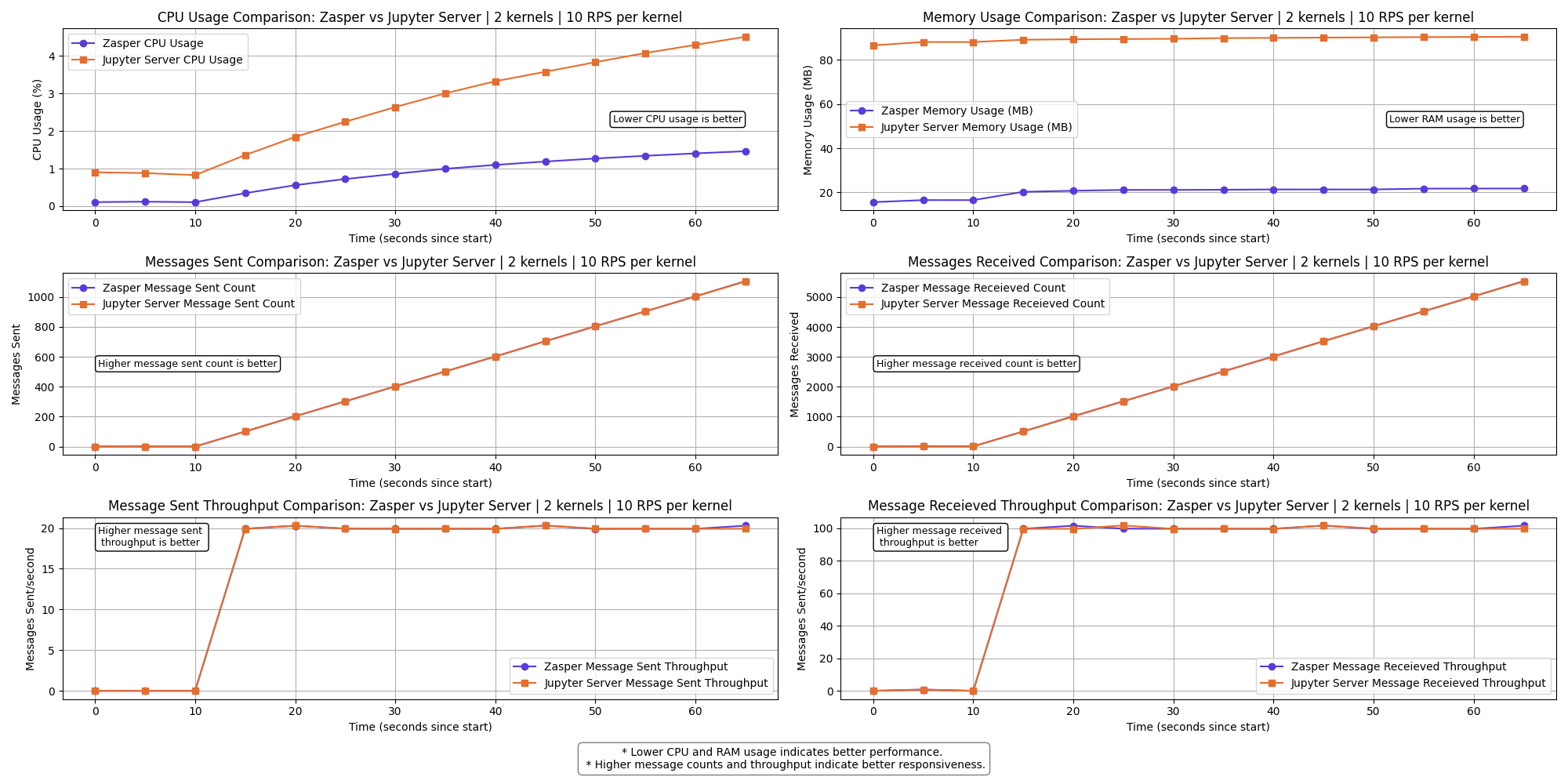
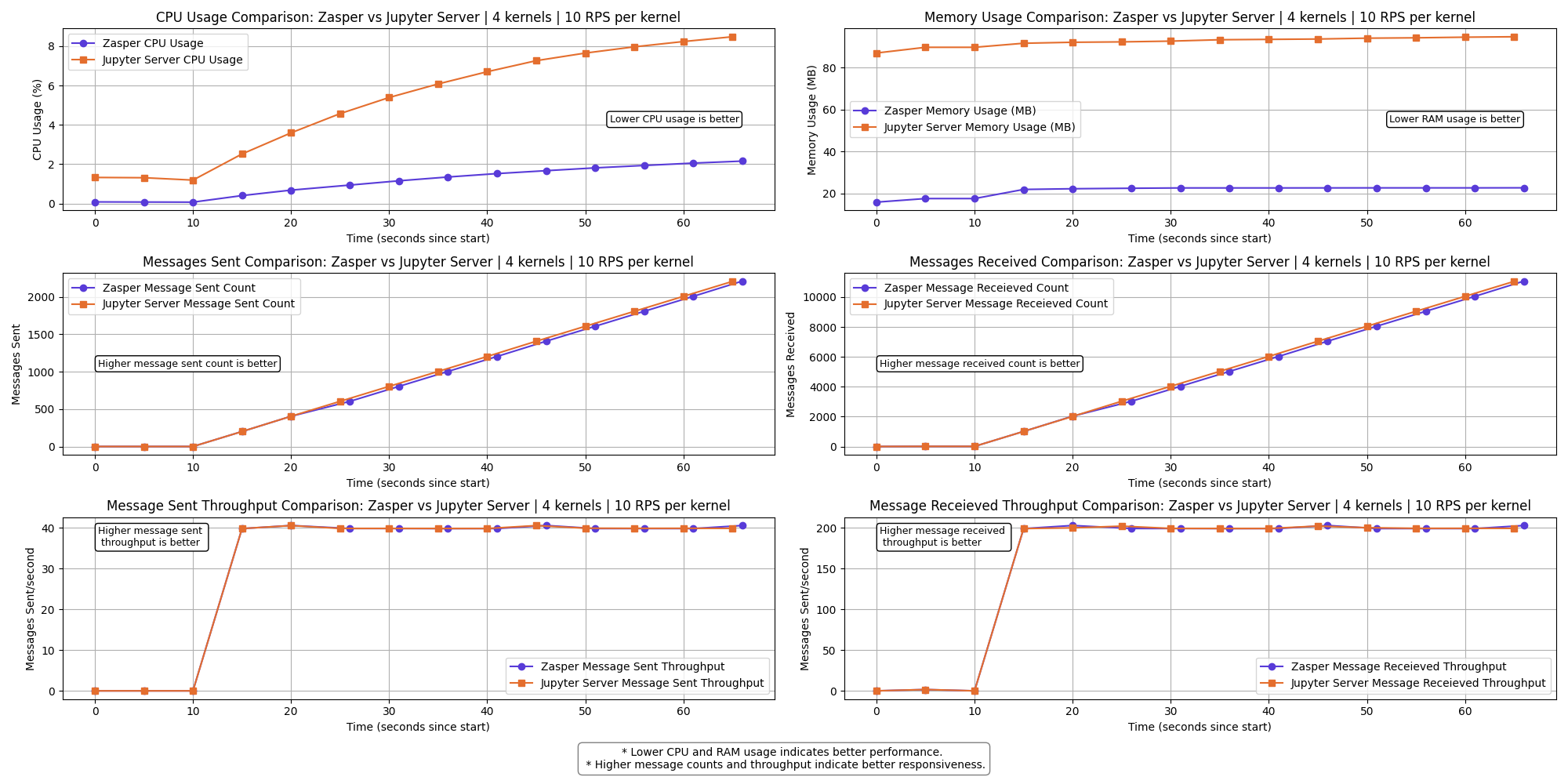
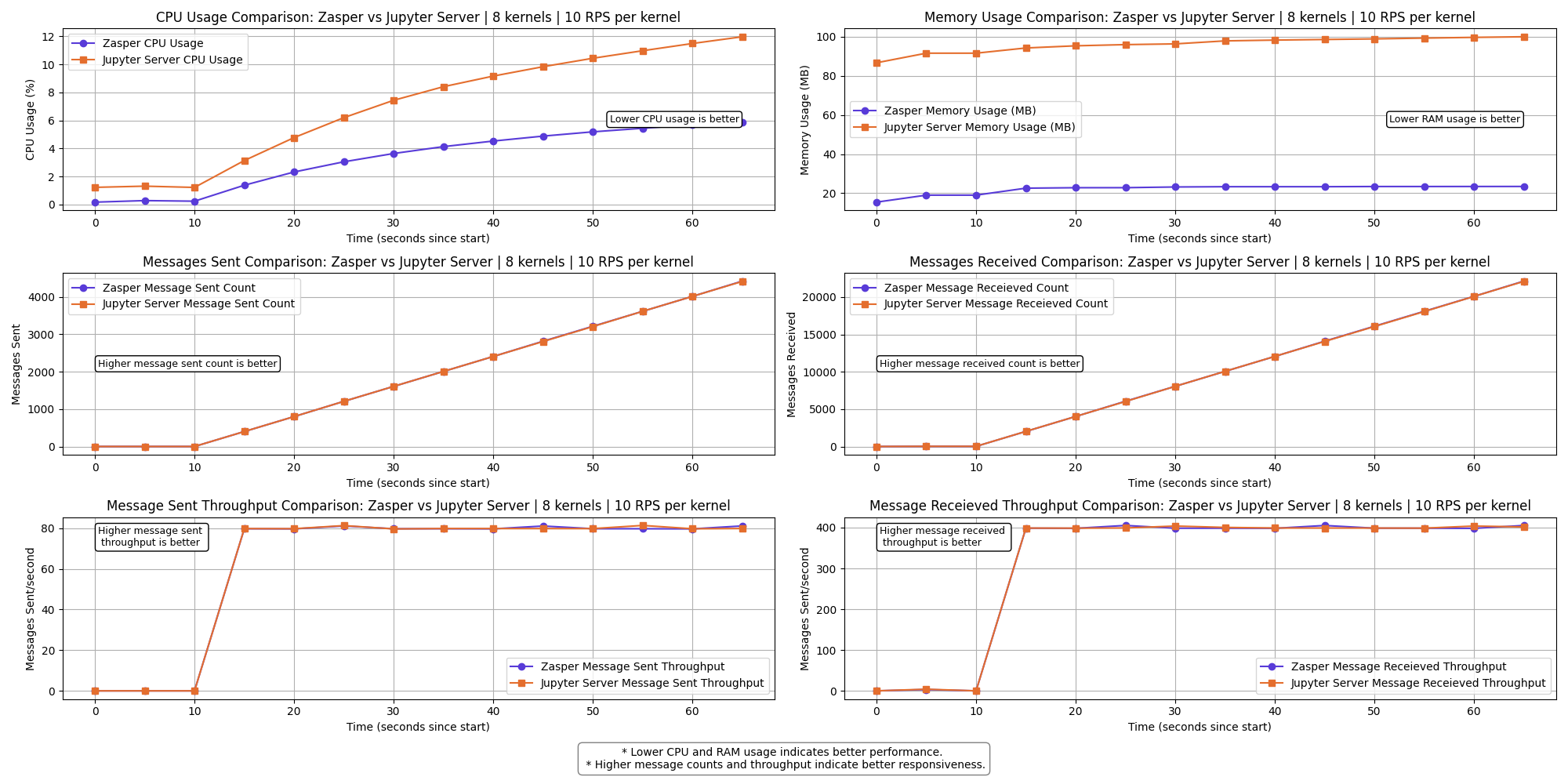
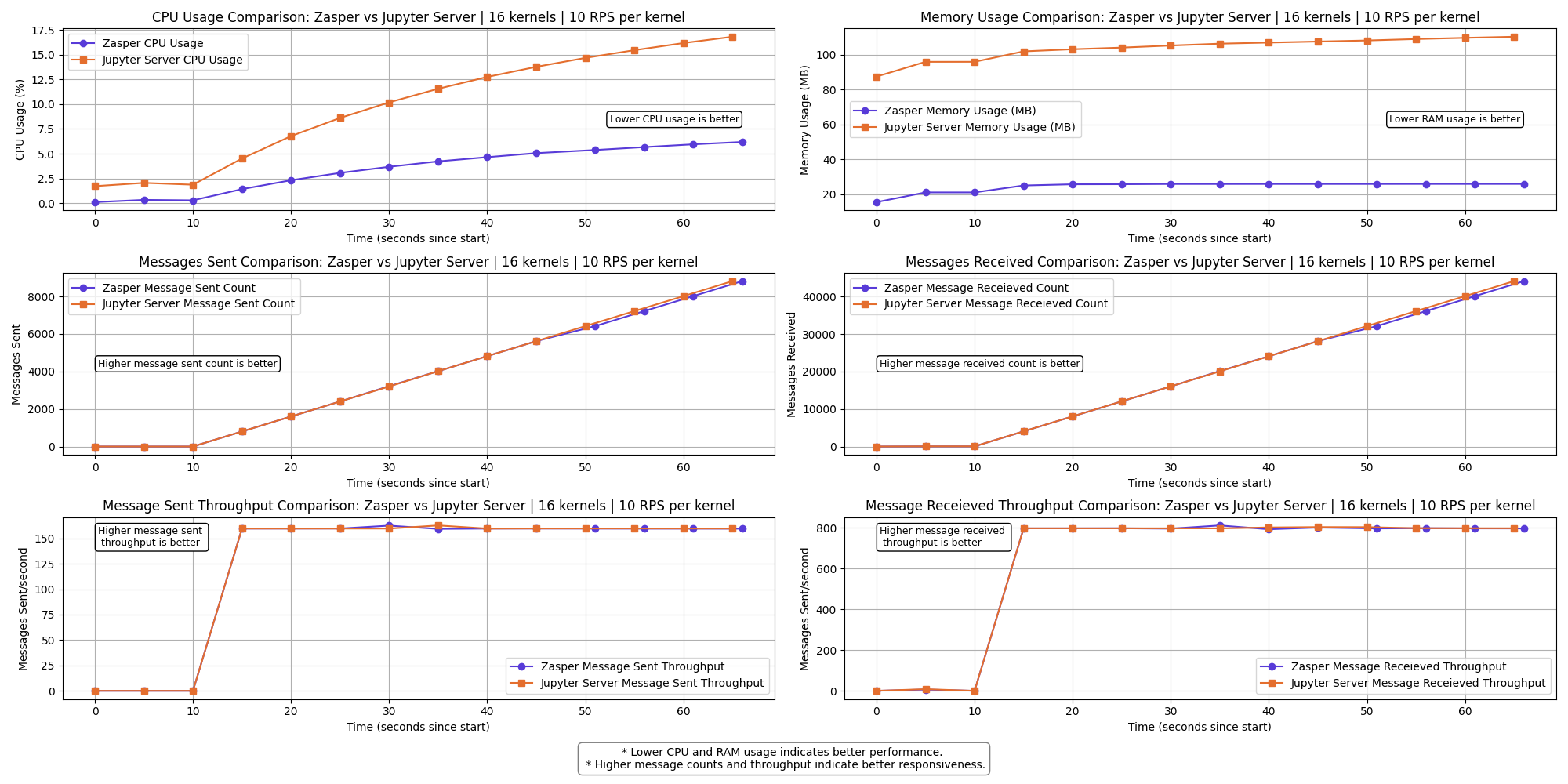
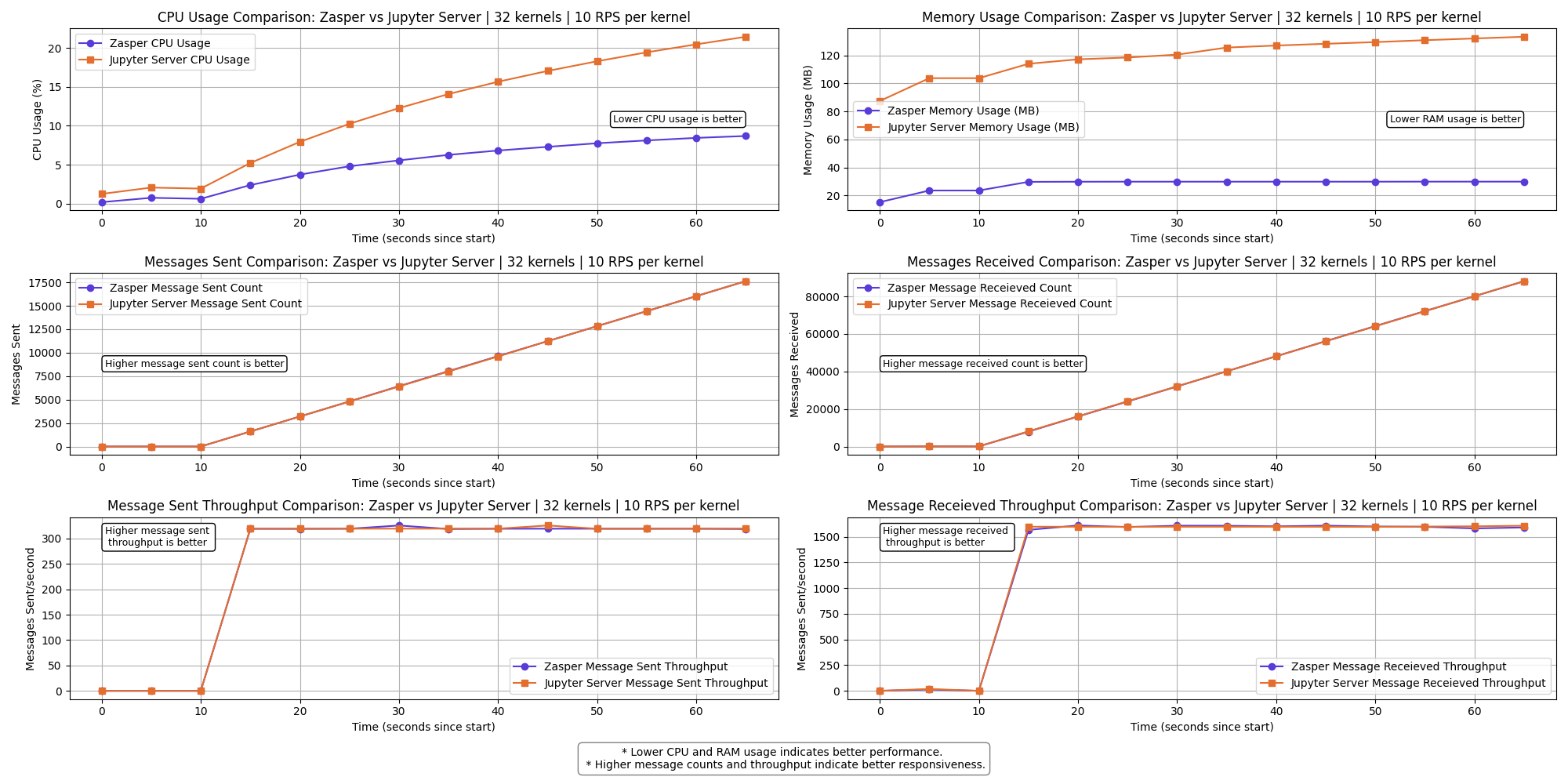
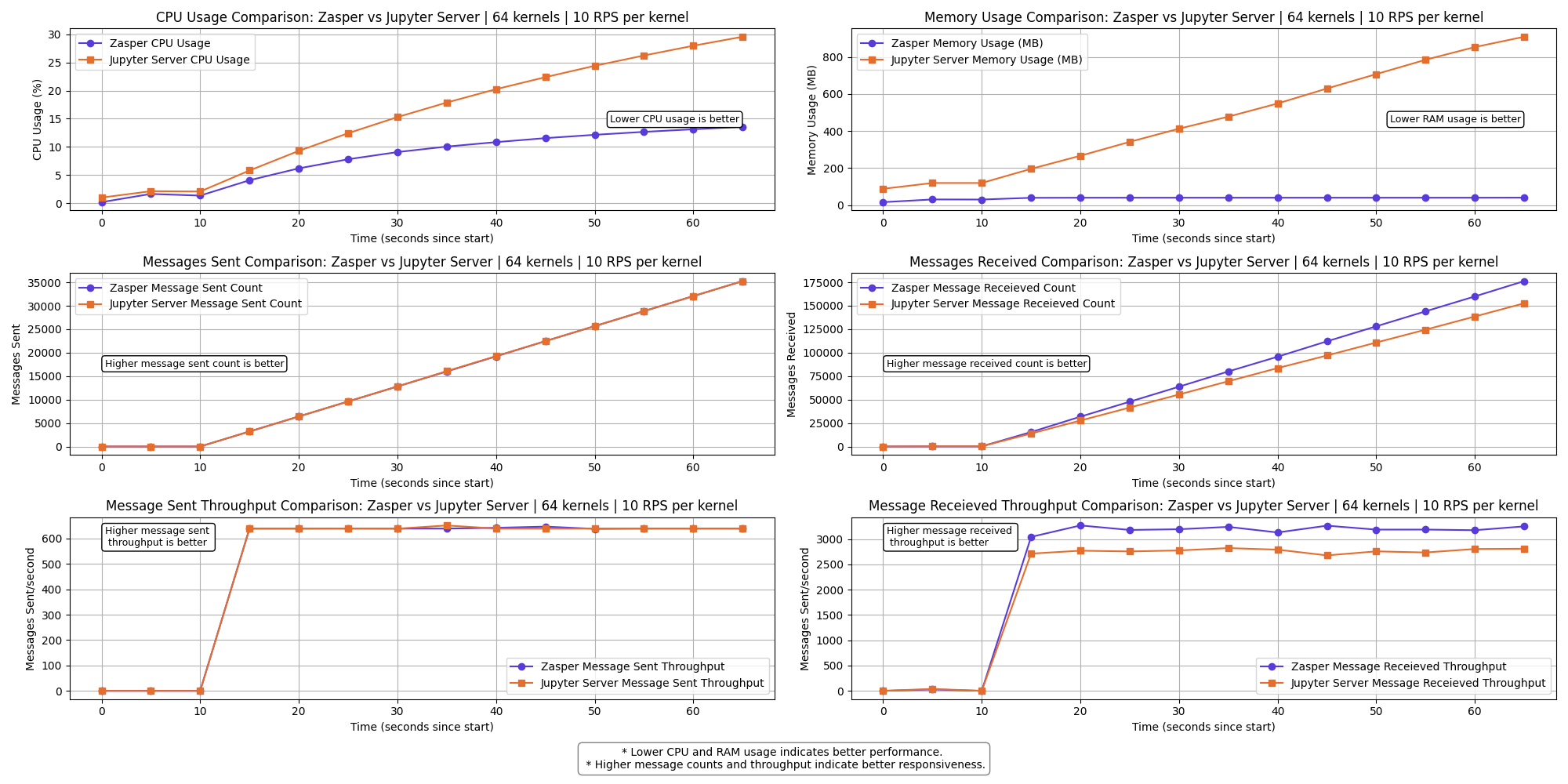
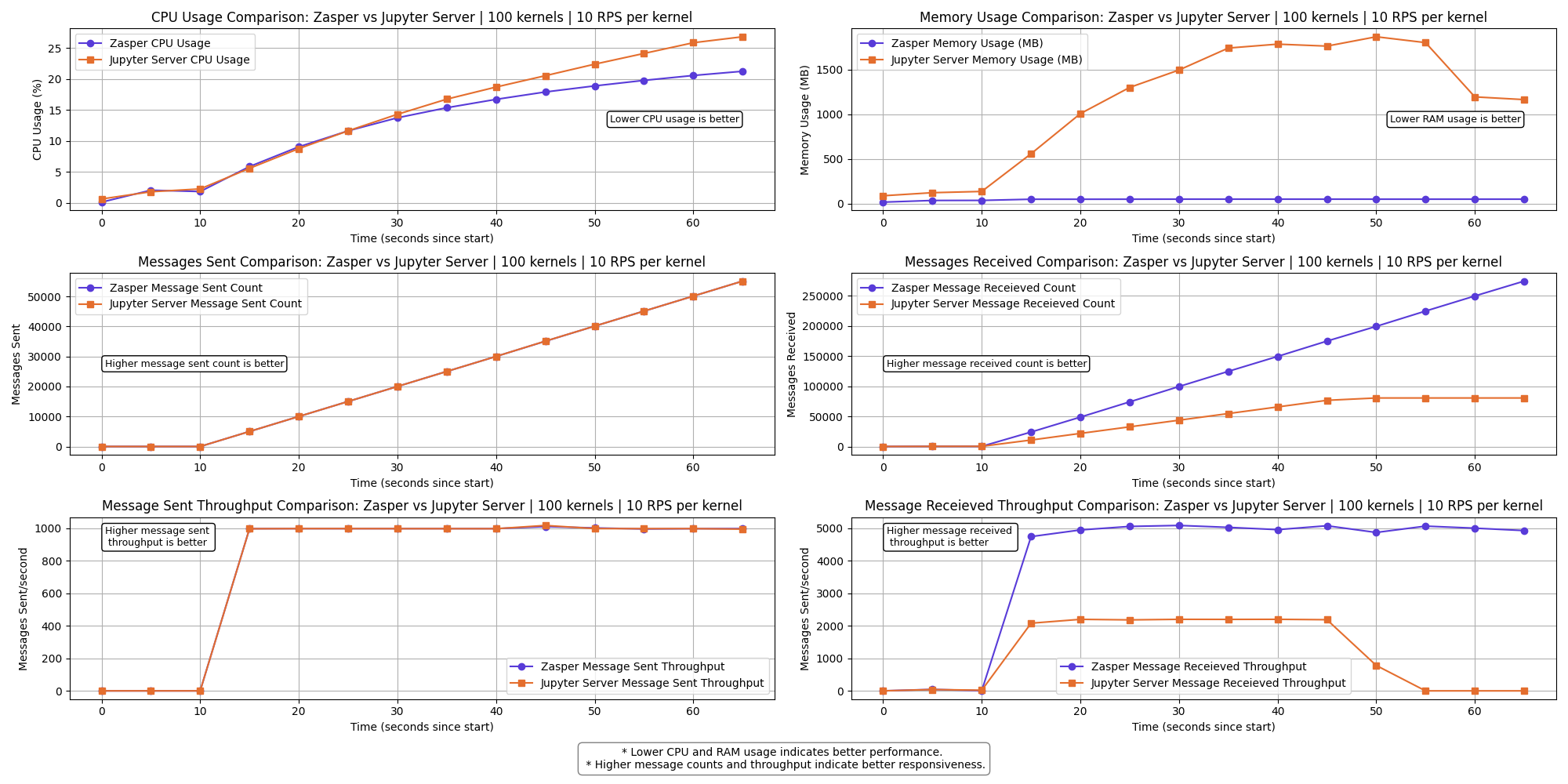
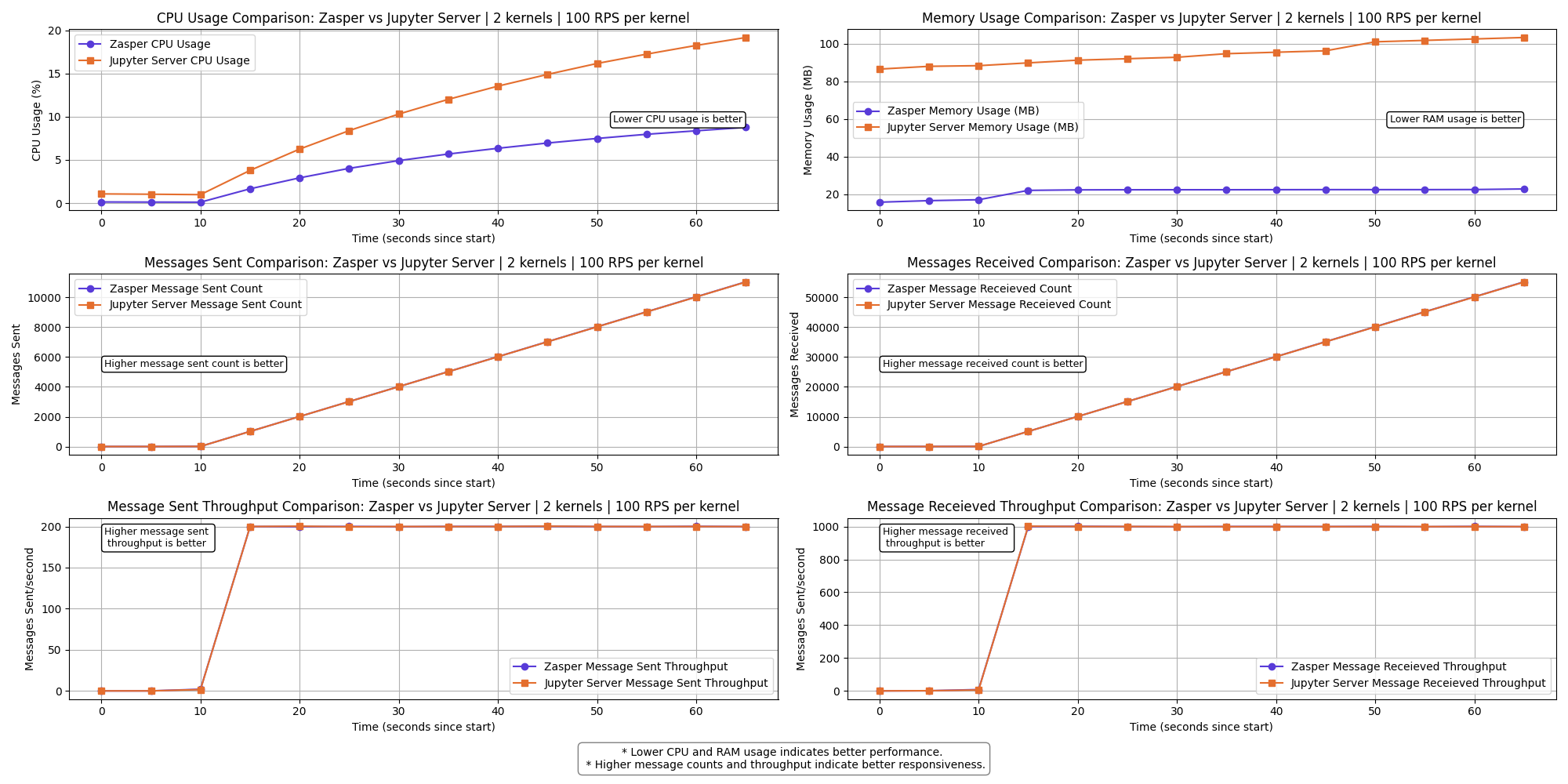
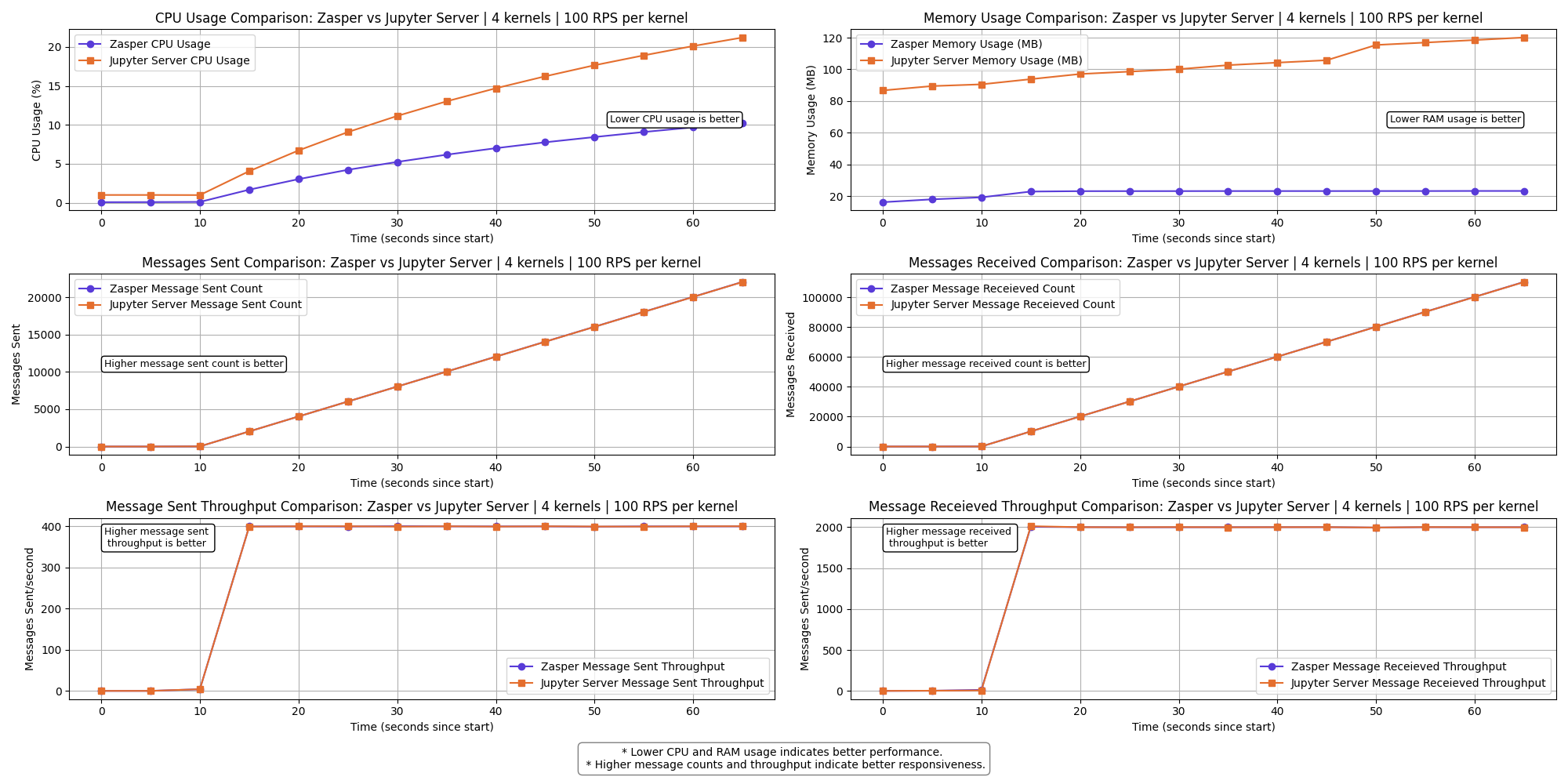
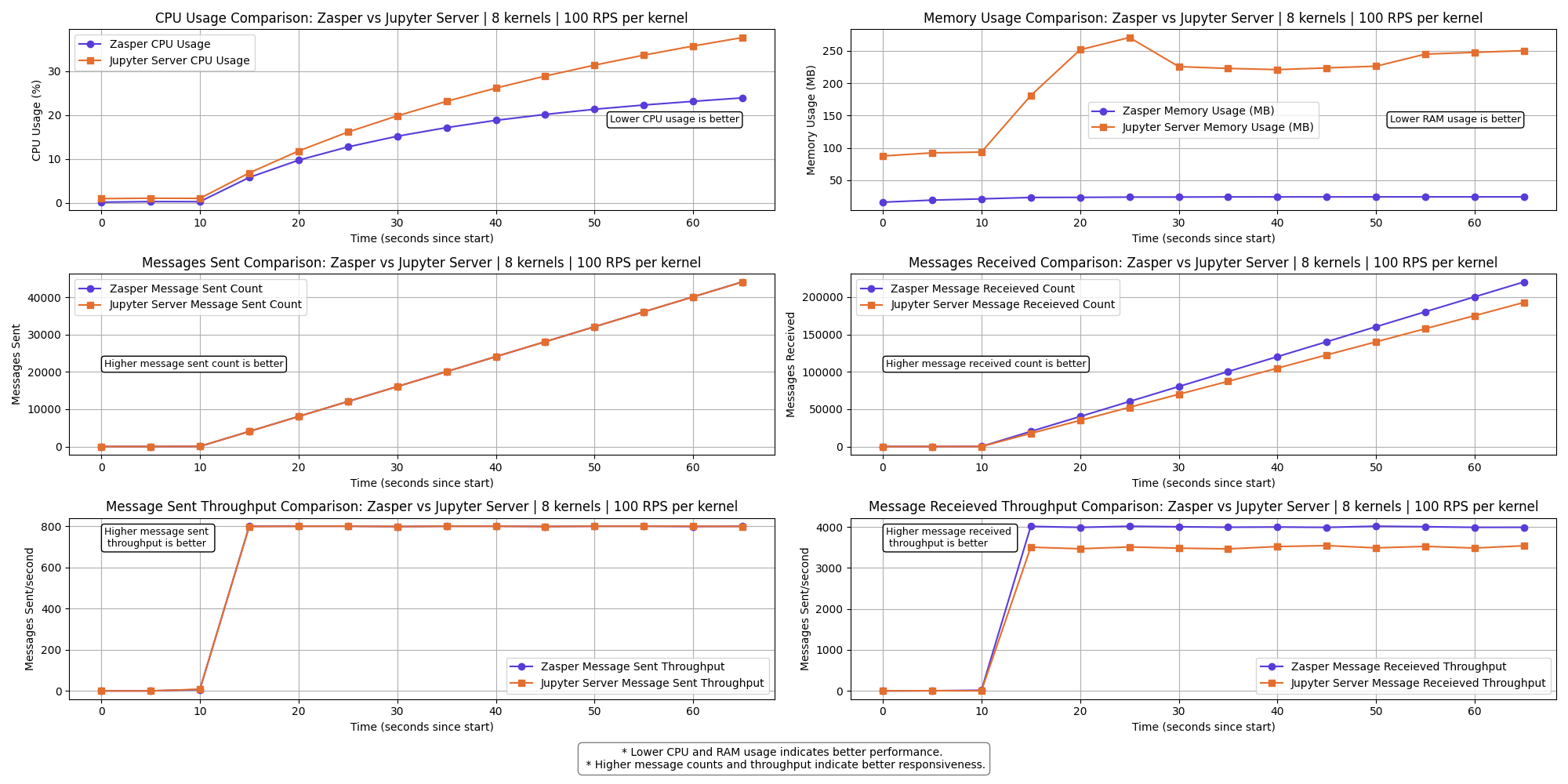
<p>The graph shows a clear performance difference between Zasper and Jupyter Server across the selected metrics.</p>

<ul>
  <li>Lower CPU usage and RAM usage is better.</li>
  <li>Higher Message sent and  Message received is better</li>
  <li>Higher Message sent per second (throughput) and Message received per second (throughput)  is better.</li>
</ul>

<h3 id="2-kernels--10-rps-per-kernel">2 kernels | 10 RPS per kernel</h3>

<p><img src="https://raw.githubusercontent.com/zasper-io/zasper-benchmark/refs/heads/main/plots/100ms/benchmark_result_2kernels.png" alt="" /></p>

<h3 id="4-kernels--10-rps-per-kernel">4 kernels | 10 RPS per kernel</h3>

<p><img src="https://raw.githubusercontent.com/zasper-io/zasper-benchmark/refs/heads/main/plots/100ms/benchmark_result_4kernels.png" alt="" /></p>

<h3 id="8-kernels--10-rps-per-kernel">8 kernels | 10 RPS per kernel</h3>

<p><img src="https://raw.githubusercontent.com/zasper-io/zasper-benchmark/refs/heads/main/plots/100ms/benchmark_result_8kernels.png" alt="" /></p>

<h3 id="16-kernels--10-rps-per-kernel">16 kernels | 10 RPS per kernel</h3>

<p><img src="https://raw.githubusercontent.com/zasper-io/zasper-benchmark/refs/heads/main/plots/100ms/benchmark_result_16kernels.png" alt="" /></p>

<h3 id="32-kernels--10-rps-per-kernel">32 kernels | 10 RPS per kernel</h3>

<p><img src="https://raw.githubusercontent.com/zasper-io/zasper-benchmark/refs/heads/main/plots/100ms/benchmark_result_32kernels.png" alt="" /></p>

<h3 id="64-kernels--10-rps-per-kernel">64 kernels | 10 RPS per kernel</h3>

<p><img src="https://raw.githubusercontent.com/zasper-io/zasper-benchmark/refs/heads/main/plots/100ms/benchmark_result_64kernels.png" alt="" /></p>

<p><strong>The messages received throughput for Jupyter Server starts to drop here.</strong></p>

<p><strong>A few kernels get disconnect for Jupyter Server.</strong></p>

<h3 id="100-kernels--10-rps-per-kernel">100 kernels | 10 RPS per kernel</h3>

<p><img src="https://raw.githubusercontent.com/zasper-io/zasper-benchmark/refs/heads/main/plots/100ms/benchmark_result_100kernels.png" alt="" /></p>

<p><strong>The messages received throughput  for Jupyter Server drops to 0.</strong></p>

<p><strong>All Jupyter kernels connections crash at this point.</strong></p>

<h3 id="resource-usage-summary--10-rps-per-kernel">Resource Usage summary | 10 RPS per kernel</h3>
<p><img src="https://raw.githubusercontent.com/zasper-io/zasper-benchmark/refs/heads/main/plots/100ms/summary_resources.png" alt="" /></p>

<h3 id="2-kernels--100-rps-per-kernel">2 kernels | 100 RPS per kernel</h3>

<p><img src="https://raw.githubusercontent.com/zasper-io/zasper-benchmark/refs/heads/main/plots/10ms/benchmark_result_2kernels.png" alt="" /></p>

<h3 id="4-kernels--100-rps-per-kernel">4 kernels | 100 RPS per kernel</h3>

<p><img src="https://raw.githubusercontent.com/zasper-io/zasper-benchmark/refs/heads/main/plots/10ms/benchmark_result_4kernels.png" alt="" /></p>

<h3 id="8-kernels--100-rps-per-kernel">8 kernels | 100 RPS per kernel</h3>

<p><img src="https://raw.githubusercontent.com/zasper-io/zasper-benchmark/refs/heads/main/plots/10ms/benchmark_result_8kernels.png" alt="" /></p>

<h3 id="16-kernels--100-rps-per-kernel">16 kernels | 100 RPS per kernel</h3>

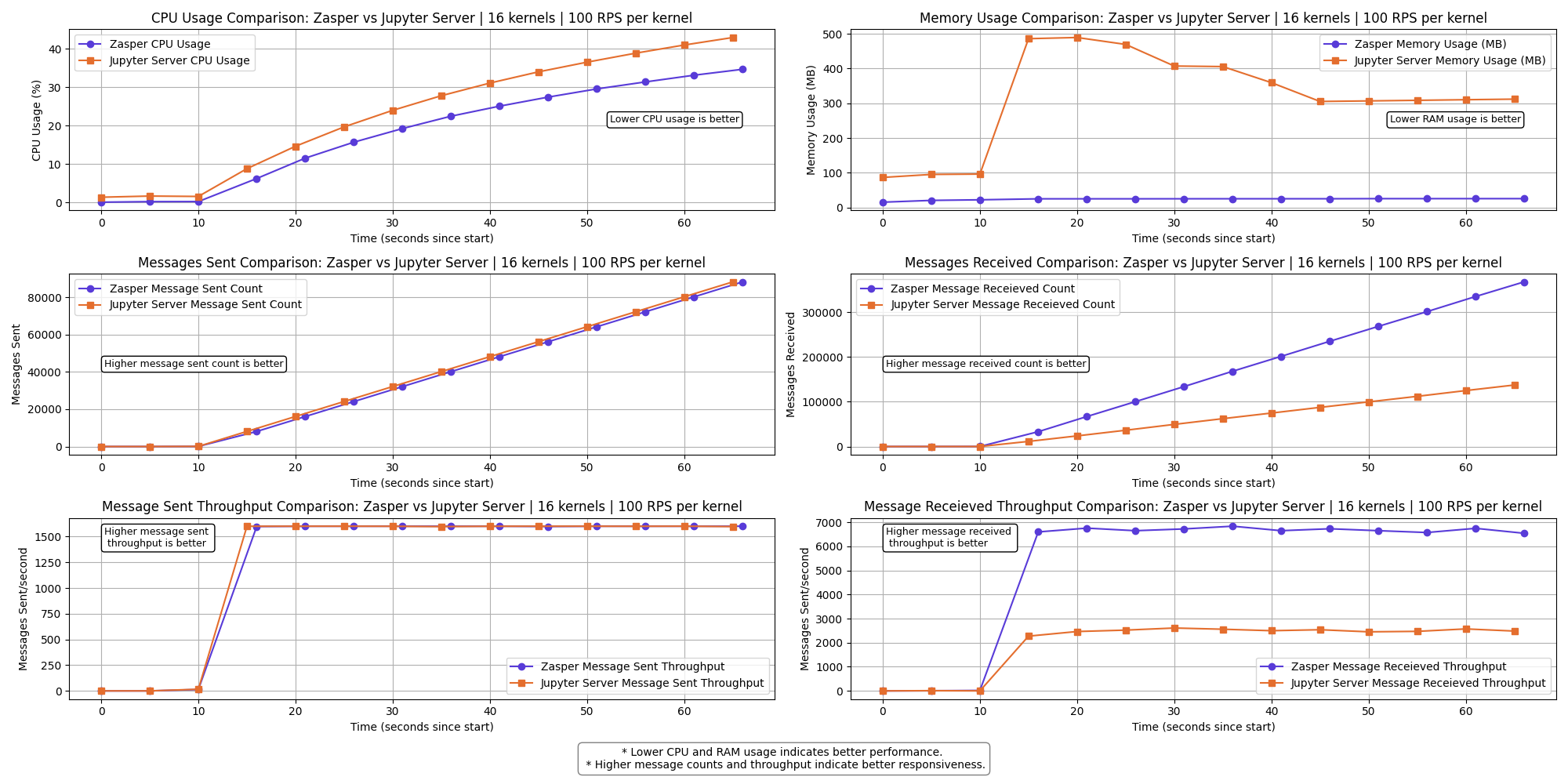
<p><img src="https://raw.githubusercontent.com/zasper-io/zasper-benchmark/refs/heads/main/plots/10ms/benchmark_result_16kernels.png" alt="" /></p>

<p><strong>The messages received throughput for Jupyter Server starts to drop here.</strong></p>

<p><strong>A few kernels get disconnect for Jupyter Server.</strong></p>

<h3 id="32-kernels--100-rps-per-kernel">32 kernels | 100 RPS per kernel</h3>

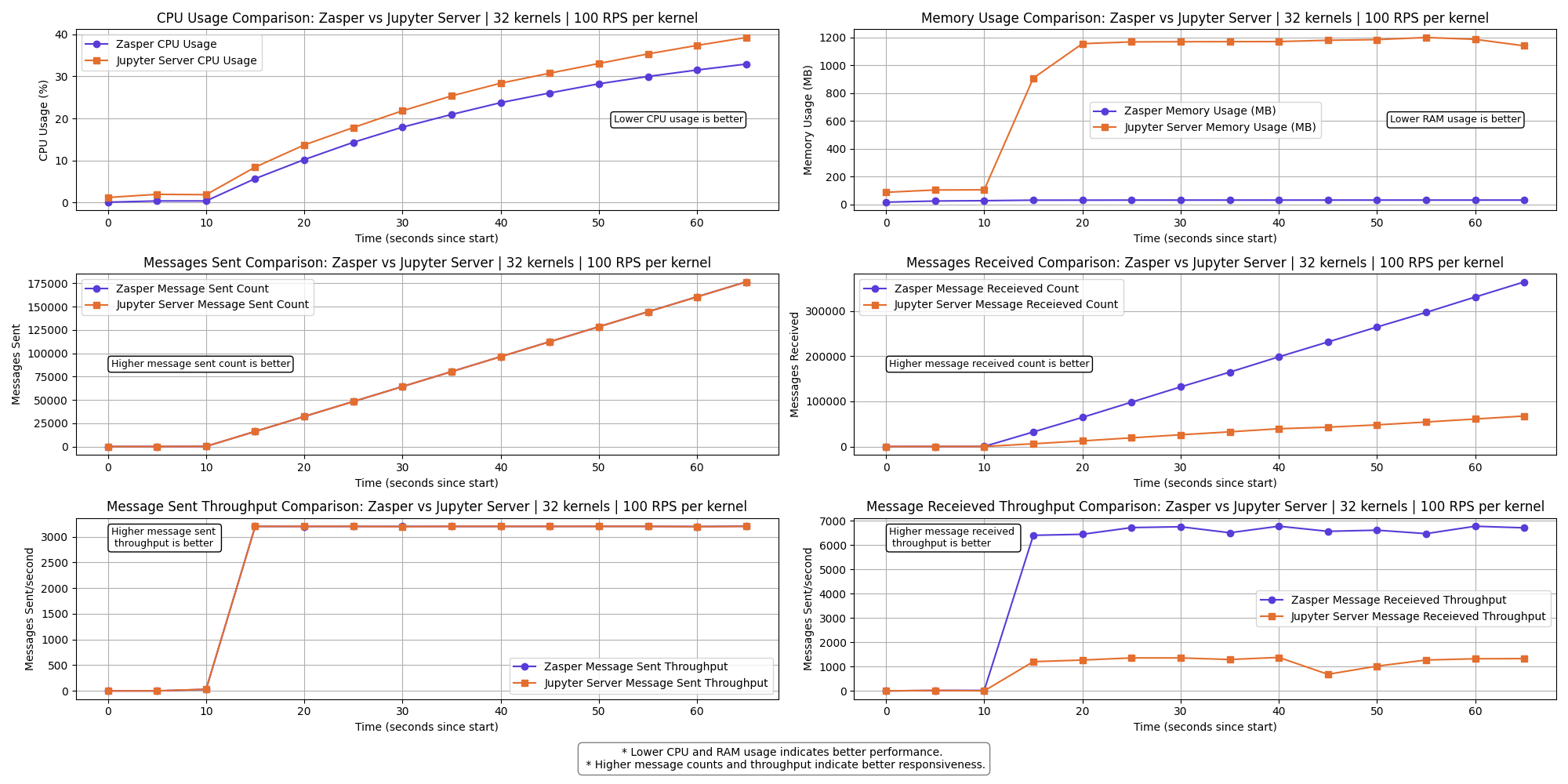
<p><img src="https://raw.githubusercontent.com/zasper-io/zasper-benchmark/refs/heads/main/plots/10ms/benchmark_result_32kernels.png" alt="" /></p>

<p><strong>The messages received throughput for Jupyter Server starts to drop even more.</strong></p>

<p><strong>A lot of kernels get disconnect for Jupyter Server.</strong></p>

<h3 id="64-kernels--100-rps-per-kernel">64 kernels | 100 RPS per kernel</h3>

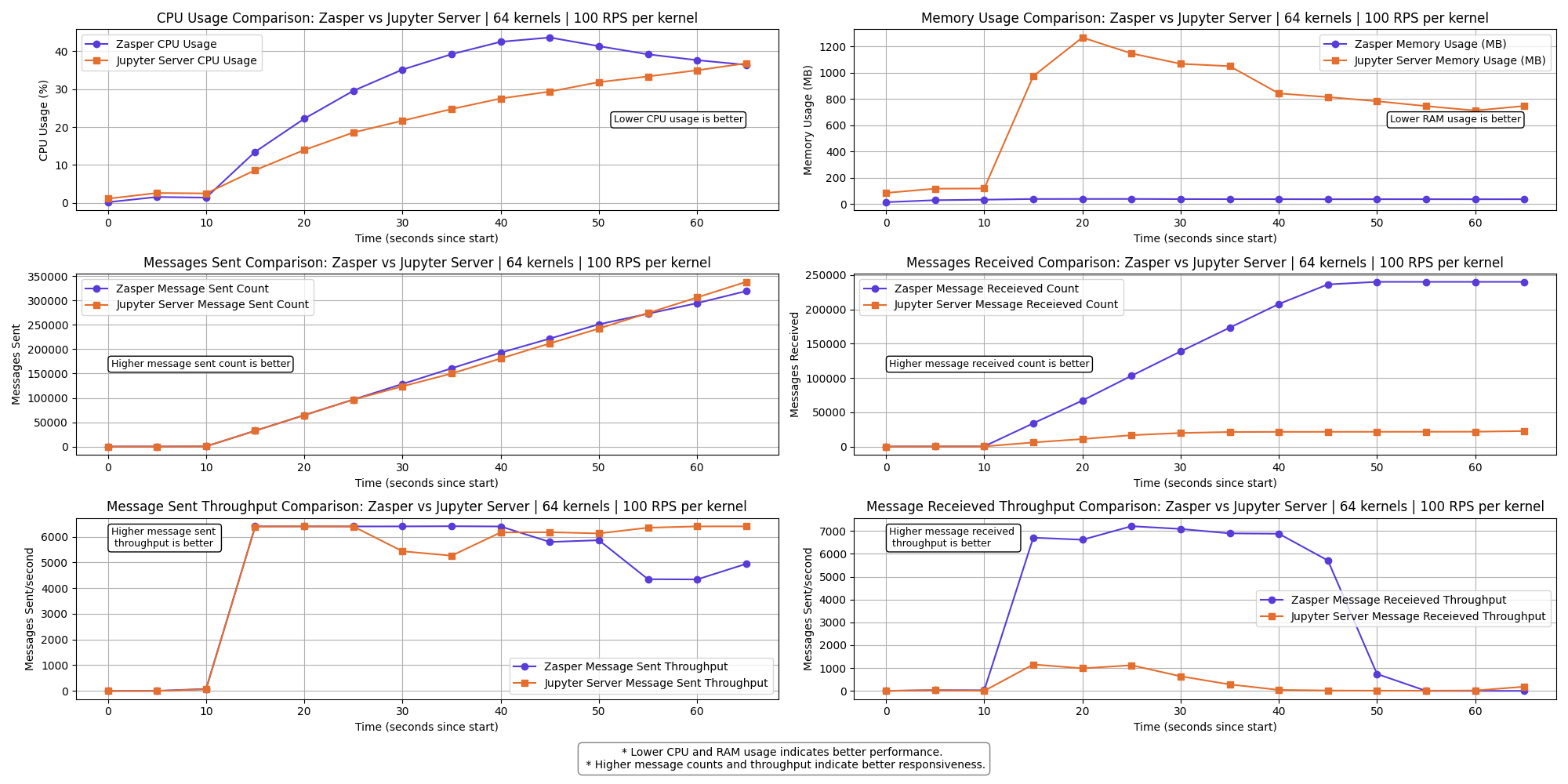
<p><img src="https://raw.githubusercontent.com/zasper-io/zasper-benchmark/refs/heads/main/plots/10ms/benchmark_result_64kernels.png" alt="" /></p>

<p><strong>The messages received throughput for  both Zasper and Jupyter Server falls to 0.</strong></p>

<p><strong>At this point IPython kernels get overwhelmed and ZeroMQ queues are completely full</strong></p>

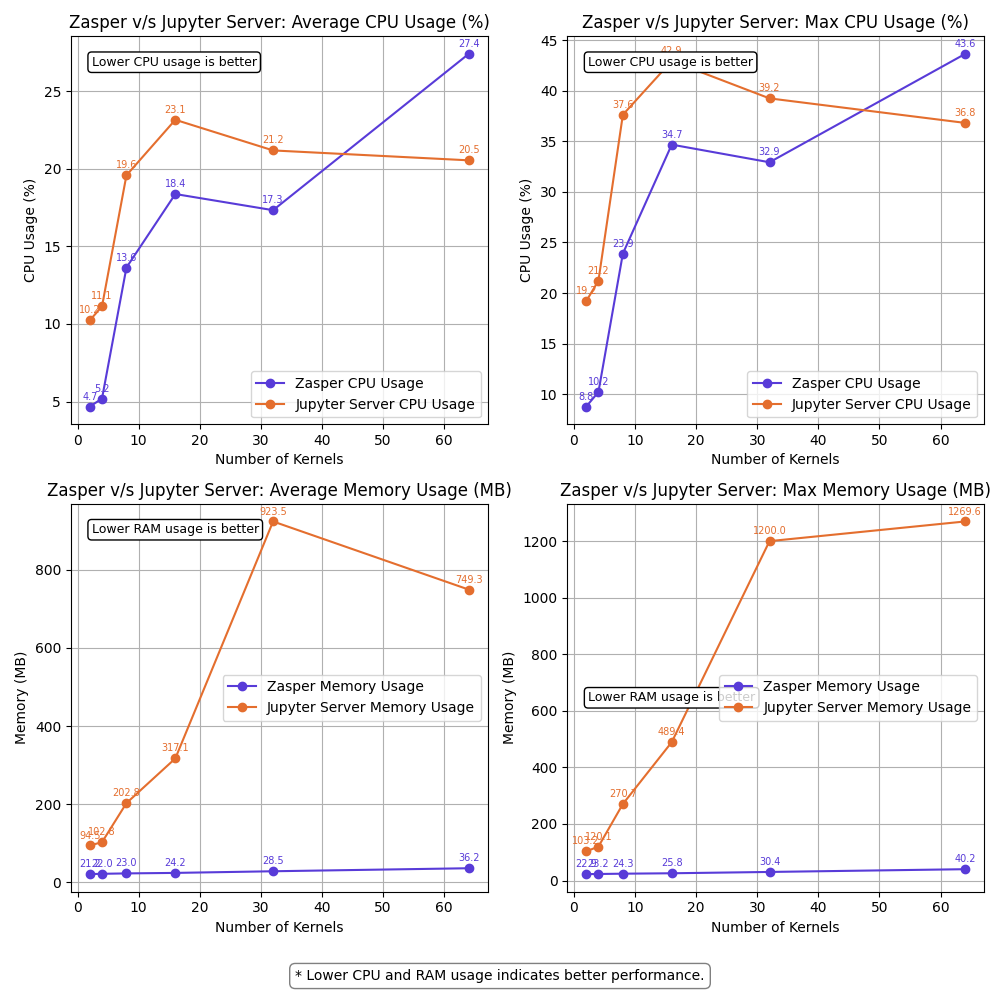
<h3 id="resource-usage-summary--100-rps-per-kernel">Resource Usage summary | 100 RPS per kernel</h3>
<p><img src="https://raw.githubusercontent.com/zasper-io/zasper-benchmark/refs/heads/main/plots/10ms/summary_resources.png" alt="" /></p>

<h3 id="observations">Observations</h3>

<ul>
  <li>Zasper consumes lesser CPU and lesser Memory in all cases.</li>
  <li>For (64 kernels at 10RPS) and (16kernel at 100RPS), Jupyter server starts losing kernel connections.</li>
  <li>For (100kernels at 10RPS) Jupyter server loose all kernel connections. Message received throughput falls to 0. ZeroMQ message queues get overloaded</li>
  <li>For (64 kernels at 100RPS) both Zasper and Jupyter server loose all kernel connections. At this point, the Jupyter kernels get overwhelmed and ZeroMQ message queues get overloaded.</li>
</ul>

<h2 id="explaining-the-crash">Explaining the crash</h2>

<h3 id="zasper-crash">Zasper crash</h3>

<ul>
  <li>Zasper crashed under very high loads compared to Jupyter Server.</li>
  <li>At 32 kernels, 100 RPS per kernel, the through drops but kernel connections are not lost.</li>
  <li>At (64 kernels, 100RPS per kernel), the ZeroMQ message queue fills up
as the <strong>Jupyter kernel</strong> doesn’t consume the messages fast and the queue fills up completely, leading to lost kernel connections.</li>
</ul>

<div class="language-plaintext highlighter-rouge"><div class="highlight"><pre class="highlight"><code>{"level":"info","time":1745735833,"message":"Error writing message: write tcp [::1]:8048-&gt;[::1]:51161: write: no buffer space available"}
{"level":"info","time":1745735834,"message":"Error writing message: write tcp [::1]:8048-&gt;[::1]:50991: write: no buffer space available"}
{"level":"error","error":"writev tcp 127.0.0.1:51485-&gt;127.0.0.1:5679: writev: no buffer space available","time":1745735834,"message":"failed to send message"}
{"level":"error","error":"writev tcp 127.0.0.1:51136-&gt;127.0.0.1:5647: writev: no buffer space available","time":1745735834,"message":"failed to send message"}
{"level":"error","error":"writev tcp 127.0.0.1:51024-&gt;127.0.0.1:5230: writev: no buffer space available","time":1745735834,"message":"failed to send message"}
{"level":"error","error":"zmq4: read/write on closed connection","time":1745735834,"message":"failed to send message"}
</code></pre></div></div>

<h3 id="jupyter-server-crash">Jupyter Server Crash</h3>

<ul>
  <li>Jupyter Server tends to crash at lower request throughput due to:
    <ol>
      <li>Message queues filling up faster because execute_reply messages are not consumed quickly enough from the ZeroMQ queues.</li>
      <li>Tornado coroutines running on a single core, combined with Python’s limited scalability, result in websocket connection failures between the client and the server.</li>
      <li>Resource contention between Tornado, ZeroMQ, and the Jupyter kernels, competing for CPU and RAM.</li>
      <li>Garbage collection (GC) further degrading performance under load.</li>
    </ol>
  </li>
  <li>At 64 kernels, 10RPS per kernel, JupyterLab stops to loose kernel connection and at 100 kernels, 10 RPS per kernel it looses all kernel connections.</li>
</ul>

<div class="language-plaintext highlighter-rouge"><div class="highlight"><pre class="highlight"><code>[W 2025-04-26 22:48:39.098 ServerApp] Write error on &lt;socket.socket fd=637, family=AddressFamily.AF_INET6, type=SocketKind.SOCK_STREAM, proto=0, laddr=('::1', 8888, 0, 0), raddr=('::1', 57168, 0, 0)&gt;: [Errno 55] No buffer space available
[W 2025-04-26 22:48:39.099 ServerApp] Write error on &lt;socket.socket fd=161, family=AddressFamily.AF_INET6, type=SocketKind.SOCK_STREAM, proto=0, laddr=('::1', 8888, 0, 0), raddr=('::1', 56615, 0, 0)&gt;: [Errno 55] No buffer space available
[W 2025-04-26 22:48:39.099 ServerApp] Write error on &lt;socket.socket fd=198, family=AddressFamily.AF_INET6, type=SocketKind.SOCK_STREAM, proto=0, laddr=('::1', 8888, 0, 0), raddr=('::1', 56658, 0, 0)&gt;: [Errno 55] No buffer space available
Task exception was never retrieved
future: &lt;Task finished name='Task-82495' coro=&lt;WebSocketProtocol13.write_message.&lt;locals&gt;.wrapper() done, defined at /Users/prasunanand/Library/Python/3.9/lib/python/site-packages/tornado/websocket.py:1086&gt; exception=WebSocketClosedError()&gt;
Traceback (most recent call last):
  File "/Users/prasunanand/Library/Python/3.9/lib/python/site-packages/tornado/websocket.py", line 1088, in wrapper
    await fut
tornado.iostream.StreamClosedError: Stream is closed

During handling of the above exception, another exception occurred:

</code></pre></div></div>
<div class="language-plaintext highlighter-rouge"><div class="highlight"><pre class="highlight"><code>[I 2025-04-26 22:48:39.134 ServerApp] Starting buffering for 3677e004-a553-479c-8cb9-f0da390eee27:1371dd36-816c-4fa0-a63b-fc7429bfd43b
Task exception was never retrieved
future: &lt;Task finished name='Task-82551' coro=&lt;WebSocketProtocol13.write_message.&lt;locals&gt;.wrapper() done, defined at /Users/prasunanand/Library/Python/3.9/lib/python/site-packages/tornado/websocket.py:1086&gt; exception=WebSocketClosedError()&gt;
Traceback (most recent call last):
  File "/Users/prasunanand/Library/Python/3.9/lib/python/site-packages/tornado/websocket.py", line 1088, in wrapper
    await fut
tornado.iostream.StreamClosedError: Stream is closed

During handling of the above exception, another exception occurred:

Traceback (most recent call last):
  File "/Users/prasunanand/Library/Python/3.9/lib/python/site-packages/tornado/websocket.py", line 1090, in wrapper
    raise WebSocketClosedError()
tornado.websocket.WebSocketClosedError
</code></pre></div></div>

<h3 id="key-observations">Key observations:</h3>

<ul>
  <li>CPU Usage: Zasper maintained consistently lower CPU usage.</li>
  <li>RAM Usage: Memory consumption was significantly lower for Zasper.</li>
  <li>Throughput: Zasper handled more execution requests per unit of time, indicating better scalability under concurrent workloads.</li>
  <li>Latency: Under extremely high load, the latency drops for both JupyterLab and Zasper. However Zasper has much lower latency compared to Jupyter Server.</li>
  <li>Resilience: Zasper is a lot more resilient compared to Jupyterlab, and can easily recover.</li>
</ul>

<h2 id="why-zasper-outperforms-jupyter-server">Why Zasper Outperforms Jupyter Server</h2>

<p>Go is a compiled language with native support for concurrency and multi-core scalability, whereas Python is an interpreted language that primarily runs on a single core. This fundamental difference gives <strong>Zasper</strong>, built in Go, a significant performance advantage over <strong>Jupyter Server</strong>, which is built in Python.</p>

<p>Jupyter Server uses the <strong>Tornado</strong> web server, which is built around Python’s <strong>asyncio</strong> framework for handling asynchronous requests. In contrast, Zasper leverages Go’s <strong>Gorilla</strong> server, which utilizes Go’s lightweight <strong>goroutines</strong> for concurrency. While both are asynchronous in nature, goroutines are much more efficient and cheaper to schedule compared to Python’s event-loop-based coroutines.</p>

<p>In Jupyter Server, submitting a request to the ZeroMQ channels involves packaging an asynchronous function into the asyncio event loop, along with futures and callbacks. The loop must then schedule and manage these functions—an operation that introduces overhead. Zasper, on the other hand, creates goroutines with minimal scheduling cost, making the process significantly faster.</p>

<p>While Python’s asyncio and Go’s goroutines share similar architectural goals, Go’s model is much closer to the hardware. It schedules coroutines across multiple CPU threads seamlessly, while Python is limited by the <strong>Global Interpreter Lock (GIL)</strong>, preventing true multi-core parallelism.</p>

<p>When request handling slows down in Jupyter Server, memory usage climbs, CPU gets overwhelmed, and the garbage collector (GC) starts to intervene—often resulting in degraded performance. Under high loads and constrained resource, the situation gets even worse as Jupyter Server, ZeroMQ and Jupyter Kernel all compete for resources, leading to Jupyter Server’s websocket connections getting lost.</p>

<p>Zasper also crashes but under extremely high loads when ZeroMQ kernels fill up as Jupyter kernels get overwhelmed. Zasper has much higher resiliency.</p>

<p>Zasper is designed around the principle of <strong>“Use More to Save More.”</strong> As request volume increases, Zasper’s efficiency becomes more apparent. Its architecture thrives under load, delivering better throughput and stability at scale.</p>

<h2 id="benefits-of-zasper">Benefits of Zasper</h2>

<h3 id="for-individual-users">For Individual Users</h3>
<ul>
  <li>Improved Responsiveness: Faster execution of notebook cells.</li>
  <li>Lightweight: Reduced memory usage allows smoother multitasking, especially on lower-spec machines.</li>
</ul>

<h3 id="for-enterprises">For Enterprises</h3>
<ul>
  <li>Cost Efficiency: Lower resource usage translates to fewer cloud compute instances required.</li>
  <li>Better Scalability: Efficient resource handling allows support for more users and sessions per node.</li>
</ul>

<h2 id="conclusion">Conclusion</h2>

<p>This benchmarking study highlights Zasper’s performance advantages over the traditional Jupyter Server. Whether for individual developers or large-scale enterprise deployments, Zasper demonstrates meaningful improvements in resource efficiency and execution throughput, making it a promising alternative for interactive computing environments.</p>

<h2 id="thanks-to-the-jupyter-community">Thanks to the Jupyter Community</h2>

<p>Zasper would not exist without the incredible work of the Jupyter community. Zasper uses the Jupyter wire protocol and draws inspiration from its architecture. Deep thanks to all Jupyter contributors for laying the groundwork. Data Science Notebooks would not have existed without them.</p>

<h2 id="support-zasper">Support Zasper</h2>

<p>If you like Zasper and want to support me in my mission, please consider <a href="https://github.com/sponsors/prasunanand">sponsoring me on GitHub</a>.</p>

<h2 id="discussions">Discussions</h2>

<p>Please feel free to mail me at <code class="language-plaintext highlighter-rouge">prasun@zasper.io</code> to report any corrections or irregularities.</p>

<h2 id="copyright">Copyright</h2>

<p>Prasun Anand</p>]]></content><author><name>Prasun Anand</name></author><category term="blog" /><summary type="html"><![CDATA[Zasper against Jupyter Server on CPU, RAM, throughput and latency, measured from 2 to 100 concurrent kernels, with the method in full.]]></summary></entry><entry><title type="html">Zasper: A Supercharged IDE for Data Science.</title><link href="https://zasper.io/blog/zasper-intro" rel="alternate" type="text/html" title="Zasper: A Supercharged IDE for Data Science." /><published>2024-12-22T02:09:59+00:00</published><updated>2024-12-22T02:09:59+00:00</updated><id>https://zasper.io/blog/zasper-intro</id><content type="html" xml:base="https://zasper.io/blog/zasper-intro"><![CDATA[<p>Zasper is an IDE designed from the ground up to support massive concurrency. It provides a minimal memory footprint, exceptional speed, and the ability to handle numerous concurrent connections.</p>

<p>It’s perfectly suited for running REPL-style data applications, with Jupyter notebooks being one example.</p>

<p><strong>Zasper uses up to 5X less CPU and up to 40X less RAM than JupyterLab.</strong> See the <a href="/blog/benchmarking-zasper-vs-jupyterlab">full benchmark</a> for the methodology and the numbers at every load level — the gap widens as concurrent load increases.</p>

<p><img class="blog-img" src="/static/images/zasper-intro.png" alt="Zasper open on a notebook, with the file explorer on the left and a chart in the cell output" /></p>

<p>Zasper runs on macOS, Linux and Windows. On Windows, WSL gives the best experience.</p>

<h2 id="why-i-built-zasper">Why I Built Zasper</h2>

<p>There are several proprietary JupyterLab-like frontend tools available in the market, such as Databricks Notebooks and Deepnote Notebooks. However, none of them are free or open-source, and most require users to work in the cloud. Even the modest personal computers these days are typically equipped with at least 8 GB of RAM, an 8-core CPU, and a decent 4 GB GPU, I saw an opportunity to create a solution that works seamlessly on local machines. That’s why I decided to build Zasper which can effectively utilize the resources available and guarantee maximum efficiency.</p>

<p>Originally I wrote https://github.com/zasper-io/zasper_py (now in Private mode) to build a new frontend around Jupyter. During the process I realized, Go is the ideal choice to rebuild the Jupyter project. Go has excellent support for REST, RPC, WS protocols. Concurrency and Performance are the areas where Go shines.</p>

<p>Go’s Concurrency: Better suited for applications requiring both concurrency and parallelism, as it leverages multiple cores effectively. It’s easier to handle blocking operations without freezing the system.</p>

<p>Python’s Event Loop: Ideal for I/O-bound applications that need to handle a lot of asynchronous tasks without blocking. However, it struggles with CPU-bound tasks and lacks native parallelism unless additional worker threads are used.</p>

<h2 id="architecture">Architecture</h2>

<p>Zasper backend is written in Gorilla. The ipython kernel is reused from Project Jupyter. Zasper backend communicates with ipython kernel via zeromq sockets.</p>

<p><img class="blog-img" src="/static/images/zasper.drawio.svg" alt="Zasper's architecture: the browser client, the Go server, and the ZeroMQ channels to each Jupyter kernel" /></p>

<p>(About Zeromq: ZeroMQ (also known as ØMQ, 0MQ, or zmq) looks like an embeddable networking library but acts like a concurrency framework. It gives 
you sockets that carry atomic messages across various transports like in-process, inter-process, TCP, and multicast.)</p>

<h2 id="messaging">Messaging</h2>

<p>Zasper follows <a href="https://jupyter-client.readthedocs.io/en/stable/messaging.html">the Wire Protocol</a> as established by Jupyter community.</p>

<h2 id="how-is-it-different">How Is It Different?</h2>

<p>Jupyter server is reimplemented in Go. Every Jupyter Notebook runs with a Jupyter kernel (IPython kernel, IJulia kernel). The JupyterLab Server 
is responsible for managing the Jupyter kernels and serves as a broker between the Jupyter Notebook running in LabApp(frontend) and Jupyter Kernel. 
Zasper replaces JupyterLab by reimplementing most of the implementations.</p>

<p>JupyterLab’s wire protocol is built using Tornado server and AsyncIO. Python’s AsyncIO runs on a single core and gets problematic when scaling.</p>

<p>Zasper on the other hand uses Gorilla and coroutines that easily scales to multiple cores. Coroutines are light weight and work independently.</p>

<p>Even if you read the code, Zasper’s implementation is much easier to understand than JupyterLab. You wouldn’t get lost in Future and callbacks.</p>

<p>I will publish a separate blog post regarding this.</p>

<h2 id="extensibility">Extensibility</h2>

<p>Zasper is designed with extensibility at its core. For example, if you want to create an internal, Google Colab-like interface within your private cloud and store your notebook files on Google Drive, this can be easily accomplished by modifying the content_manager module of Zasper. By implementing custom content readers and writers for Google Drive, you can seamlessly integrate it as a storage backend.</p>

<p>Similarly, many organizations prefer using MinIO for object storage, and they can achieve a Google Colab-like experience by adapting the same approach.</p>

<h2 id="future-roadmap">Future Roadmap</h2>

<p>Data Scientists and AI Engineers spend most of their time running Notebooks on IDEs and hence need a robust ecosystem. Zasper aspires to be a full fledged IDE and the future development will be along making it more efficient by:</p>

<ul>
  <li>Allowing custom data apps support rather than just Jupyter Notebooks.</li>
  <li>Easier integration with the existing tools.</li>
  <li>Zasper Hub for Self Hosted deployment in the cloud.</li>
</ul>]]></content><author><name>Prasun Anand</name></author><category term="blog" /><summary type="html"><![CDATA[Why Zasper was built, how a Go implementation of the Jupyter protocol is put together, and what it does differently from JupyterLab.]]></summary></entry></feed>